Showing posts with label jmx. Show all posts

20 September 2007

Command Line Monitoring of Thread Pool Sizes

Want to periodically view the OC4J thread pool sizes from the command line?

Using Groovy + JMX , its dead simple:
import demo.oc4j.jmx.*;
import java.text.*;

def period = 5000L
def client = new OC4JClient()
def df = DateFormat.getTimeInstance(DateFormat.LONG)

try {
client.connect("service:jmx:rmi://10.187.112.178:23791",
"oc4jadmin", "welcome1")

println "$client\n"

http = client.helper.createGroovyMBean(
"oc4j:j2eeType=ThreadPool,name=http,J2EEServer=standalone")

system = client.helper.createGroovyMBean(
"oc4j:j2eeType=ThreadPool,name=system,J2EEServer=standalone")
jca=client.helper.createGroovyMBean(
"oc4j:j2eeType=ThreadPool,name=jca,J2EEServer=standalone")


while(true) {
now = df.format(new Date(System.currentTimeMillis()));
println "$now HTTP:[$http.poolSize] JCA:[$jca.poolSize] System:[$system.poolSize]"
Thread.sleep(period)
}
} finally {
println 'Closing'
client.close()
}

This makes use of the OC4J helper library, which you can access here.

A simple script to run this would look like this:

@setlocal
set J2EE_HOME=d:\java\oc4j-10133-prod\j2ee\home
set GROOVY_HOME=d:\java\groovy-1.0
set classpath=lib\oc4jgroovy.jar;%GROOVY_HOME%\lib\commons-cli-1.0.jar;/
%GROOVY_HOME%\embeddable\groovy-all-1.0.jar;%J2EE_HOME%\admin_client.jar;%J2EE_HOME%\oc4jclient.jar

java -classpath %CLASSPATH% groovy.lang.GroovyShell src\threadlevel.groovy
@endlocal


When the script is run, it produces this sort of output:

Client is connected to: rmi://10.187.112.178:23791 oc4jadmin [connectionCaching:
true, httpTunneling:false, locale:not set]

1:03:54 HTTP:[7] JCA:[1] System:[7]
1:03:59 HTTP:[7] JCA:[1] System:[7]
1:04:06 HTTP:[7] JCA:[1] System:[7]
1:04:11 HTTP:[7] JCA:[1] System:[7]


----------------
Listening to: Ned's Atomic Dustbin - What Gives My Son?

25 June 2007

Using Groovy to operate with OC4J Groups

Update: the client code referenced in this post, and a sample script to create an OC4J group and populate it with OC4J instances is available here:
The Oracle Application Server 10g Release 3 product exposes the concept of OC4J Groups. An OC4J group is a formal entity that represents a set of separate OC4J instances as a single unit. An OC4J group can be started, stopped; it can be configured and managed; deployment operations can be conducted against it. In all cases, the task performed on the group is is delegated out to the individual OC4J instances that reside within the group to be actioned.
To effectively support the management and configuration of an OC4J group, a cluster MBeanServer model is utilized in conjunction with a special MBean that represents an OC4J group.
The cluster MBeanServer is a specialized MBeanServer that works with the OPMN technology in Oracle Application Server so that it is always aware of all the individual MBeanServer instances running witihn the connected network topology.
The J2EEServerGroupMBean is an MBean that performs the task of exposing a group to MBean clients so that MBeans can be interacted with. The J2EEServerGroupMBean closely resembles the MBeanServer interface and enables clients to perform operations, get and set attributes on a specified MBean. When the tasks are executed on the J2EEServerGroupMBean, the J2EEServerGroupMBean will federate the operations to all the running MBeanServers in the OC4J instances that reside in the group.
A distinct difference from the standard MBeanServer interface is that tasks that have a return value will return a Map instead of an Object. The Map contains the results of the task execution from each of the OC4J instances that participated in the requested task. The OC4J instance name is used as the key for each entry in the Map and the value is the result of the executed task.
http://download-west.oracle.com/docs/cd/B31017_01/web.1013/e10288/oracle/oc4j/admin/management/farm/mbeans/J2EEServerGroupMBean.html
To use the J2EEServerGroupMBean, a client first connects to the OC4J cluster MBeanServer. The respective J2EEServerGroup MBean is located for the target group. Once a reference to the J2EEServerGroup MBean is obtained, it is used to execute operations or set and get attributes against any specific MBean that resides within the MBeanServers of the OC4J instances within the group.
Unfortunately, since the J2EEServerGroupMBean is an actual MBean itself that exposes methods to work on other MBeans, using it either from either direct Java code, or using it from Groovy as an GroovyMBean means that you need to resort to using the primitive invoke, setAttribute, getAttribute methods to perform tasks on a specified MBean.
Ideally, it’d be more productive and suit the scripting approach more naturally to be able to perform a task on an MBean through the simplified GroovyMBean approach but have it performed at the group level. When the tasks are executed on a specified MBean, the J2EEServerGroupMBean would be used under the covers to execute the invoke, setAttribute or getAttribute methods.
Making a Group GroovyMBean

It turns out that using the power of the Groovy meta-data model and Java subclassing, it’s possible to create an extension of the standard GroovyMBean (called OC4JgroupGroovyMBean in here) that does just that.
By passing a GroovyMBean object that wrappers the target MBean into an OC4JGroupGroovyMBean object, the OC4JGroupGroovyMBean can be made to look exactly like the GroovyMBean thus directly exposing all the attributes and operations from the underlying MBean.
Through overriding specific methods such as setProperty, getProperty and invokeMethod, the tasks are conducted through the specified J2EEServerGroupMBean instead of the standard MBeanServer connection and are therefore conducted against the J2EEServerGroup.

The example OC4JGroupGroovyMBean has a constructor of the following form:
public OC4JGroupGroovyMBean(MBeanServerConnection clusterConnection, ObjectName groupMBeanName,GroovyMBean mbean)
The first parameter contains the connection to an OC4J Cluster MBeanServer.
The second parameter is the ObjectName that represents the target J2EEServerGroup on which to execute the tasks.
The third parameter is a GroovyBean that has been created for the target MBean that is to be operated on.
At this point, it’s more illustrative to present a simple example. Lets consider that we have a two-instance installation of Oracle Application Server, on which we have a group called COLORS in which reside two OC4J instances, RED and BLUE.
Across the COLORS group, for each OC4J instance we wish to view the vendor and version of the JDK that is being used, and report the current memory that has been consumed by the running instance.
As a starting point, the OC4J MBean that contains the required information is the JVMMBean.
This can be obtained from an OC4J MBeanServer using the ObjectName “oc4j:j2eeType=JVM,name=single,J2EEServer=standalone”.
The target J2EEServerGroup will have an ObjectName of the form “ias:j2eeType=J2EEServerGroup,name=
import demo.oc4j.jmx.*;
// First create a GroovyMBean for the target MBean
client = new OC4JClient()
client.connect("service:jmx:rmi:///opmn://localhost/home", "oc4jadmin","welcome1")
jvm = client.helper.createGroovyMBean("oc4j:j2eeType=JVM,name=single,J2EEServer=standalone")
// Now create an OC4JGroupGroovyMBean around it
clusterClient = new OC4JClient();
clusterClient.connect("service:jmx:rmi:///opmn://localhost/cluster", "oc4jadmin","welcome1")
def group_jvm =
new OC4JGroupGroovyMBean(clusterClient.connection,
”ias:j2eeType=J2EEServerGroup,name=default_group",
jvm);
def memory = group_jvm.freeMemory;
memory.keySet().each() {
def mem = memory.get(it) / 1024 / 1024
println "$it\n\t-->free $mem MB\n"
}
// close the clients
client.close()
clusterClient.close()
Which when executed produces the following output:

ias:j2eeType=JVMProxy,name=1,J2EEServerGroup=COLORS,J2EEServer=RED,ASInstance=j2ee_server.SERVER
-->free 454.37 MB
ias:j2eeType=JVMProxy,name=1,J2EEServerGroup=COLORS,J2EEServer=BLUE,ASInstance=j2ee_server.SERVER
-->free 453.977 MB

The code for the OC4JGroupGroovyMBean is quite simple and just overrides a couple of the methods on the standard GroovyMBean.

The listing for OC4JGroupGroovyMBean example is below.
package demo.oc4j.jmx;

// Use wide imports just for saliency 
import groovy.lang.*;
import groovy.util.*;
import java.io.*;
import java.util.*;
import java.util.logging.*;
import javax.management.*;
import oracle.oc4j.admin.management.farm.mbeans.proxies.*;

/**
 * This class is derived from the work done by the official 
 * Groovy development team at "The Codehaus - http://groovy.codehaus.org/"
 * 
 * The purpose is to use the same simple model of interacting with MBeans
 * from Groovy as if they were local object, but now at the OC4J Group level
 * via the J2EEServerGroupMBean.
 * 
 * This is specific to the OC4J Group mechanism and not general purpose.
 * 
 */
public class OC4JGroupGroovyMBean extends GroovyMBean {

    static Logger logger = Logger.getLogger(OC4JGroupGroovyMBean.class.getName());

    J2EEServerGroupMBeanProxy groupProxy = null;
    MBeanServerConnection clusterConnection = null;
    ObjectName groupMBeanName = null;
    
    // This overrides the operations map from the parent class because its a 
    // private field and it can't be accessed from here
    Map operations = new HashMap();

    /**
     * Construct an OC4JGroupGroovyMBean that represents the named MBean at 
     * the OC4J Group level.
     * @param clusterConnection -- connection to OC4J cluster domain
     * @param groupMBeanName -- string form of the J2EEServerGroupMBean name
     * @param mbean -- the GroovyMBean to perform operations on
     * @throws JMException
     * @throws IOException
     */
    public OC4JGroupGroovyMBean(MBeanServerConnection clusterConnection,
                                String groupMBeanName, 
                                GroovyMBean mbean) throws JMException, 
                                                          IOException {
        this(clusterConnection, new ObjectName(groupMBeanName), mbean);
    }
    
    /**
     * Construct an OC4JGroupGroovyMBean that represents the named MBean at 
     * the OC4J Group level.
     * @param clusterConnection -- connection to OC4J cluster domain
     * @param groupMBeanName -- ObjectName for the J2EEServerGroupMBean name
     * @param mbean -- the GroovyMBean to perform operations on
     * @throws JMException
     * @throws IOException
     */
    public OC4JGroupGroovyMBean(MBeanServerConnection clusterConnection,
                                ObjectName groupMBeanName,
                                GroovyMBean mbean) throws JMException, IOException {
        
        // Make this object look like the GroovyMBean for the specified MBean
        super(mbean.server(), mbean.name());
        
        this.clusterConnection = clusterConnection;
        this.groupMBeanName = groupMBeanName;

        // Populate the operations map needed to conduct the invoke operation
        try {
            operations = populateOperations(mbean);
        } catch (IntrospectionException e) {
            throw new JMException(e.getMessage());
        }
        
        // Create a dynamic proxy for the J2EEServerGroup
        groupProxy = (J2EEServerGroupMBeanProxy)
                MBeanServerInvocationHandler.newProxyInstance(
                clusterConnection, 
                groupMBeanName,
                J2EEServerGroupMBeanProxy.class,
                false);
    }

    /**
     * Get a set of properties from an MBean via a J2EEServerGroup
     * @param props
     * @return Map where v = instancename, t = String[] of values
     */
    public Map getProperties(Collection props) {
        String[] properties = (String[]) props.toArray(new String[0]);
        logger.log(Level.FINE, "getProperty, properties = " + properties);        
        Map ret = new HashMap();
        try {
            Map data = groupProxy.getAttributes(this.name(), properties);
            for(ObjectName id: data.keySet()) {
                AttributeList attributes = data.get(id);
                List values = new ArrayList();
                for (int i = 0; i <>
                    Attribute attribute= (Attribute) attributes.get(i);
                    values.add(attribute.getValue());
                }
                ret.put(id, values);
            }
        }
        catch (MBeanException e) {
            throw new GroovyRuntimeException("Could not access property: " + properties + ". Reason: " + e, e.getTargetException());
        }
        catch (Exception e) {
            throw new GroovyRuntimeException("Could not access property: " + properties + ". Reason: " + e, e);
        }
        return ret;
    }
    
    /**
     * Get a property from an MBean via a J2EEServerGroup
     * @param property
     * @return Map of property values from each OC4J instance in the Group
     */
    public Map getProperty(String property) {
        logger.log(Level.FINE, "getProperty, property = " + property);        

        Map ret = null;
        try {
            ret = groupProxy.getAttribute(this.name(), property);
        }
        catch (MBeanException e) {
            throw new GroovyRuntimeException("Could not access property: " + property + ". Reason: " + e, e.getTargetException());
        }
        catch (Exception e) {
            throw new GroovyRuntimeException("Could not access property: " + property + ". Reason: " + e, e);
        }
        return ret;
    }
    
    /**
     * Set a property on an MBean via the J2EEServerGroupMBean
     * @param property
     * @param value
     */
    public void setProperty(String property, Object value) {
        logger.log(Level.FINE,"setProperty, property = " + property + ", value = " + value);        
        try {
            groupProxy.setAttribute(this.name(), new Attribute(property, value));
        }
        catch (MBeanException e) {
            throw new GroovyRuntimeException("Could not set property: " + property + ". Reason: " + e, e.getTargetException());
        }
        catch (Exception e) {
            throw new GroovyRuntimeException("Could not set property: " + property + ". Reason: " + e, e);
        }
    }

    /**
     * Set properties on the MBean via the J2EEServerGroupMBean 
     * @param properties
     * @return Map of results from each instance of setting the properties 
     */
    public Map setProperties(Map properties) {
        try {
            AttributeList attributes = new AttributeList();
            for(String key: properties.keySet()) {
                Attribute attribute = new Attribute(key, properties.get(key));
                attributes.add(attribute);
            }
            return groupProxy.setAttributes(this.name(), attributes);
        }
        catch (MBeanException e) {
            throw new GroovyRuntimeException("Could not set properties: " + properties+ ". Reason: " + e, e.getTargetException());
        }
        catch (Exception e) {
            throw new GroovyRuntimeException("Could not set properties: " + properties  + ". Reason: " + e, e);
        }
    }

    /**
     * Invoke a method on the J2EEServerGroupProxy
     * @param method
     * @param args
     * @return
     */
    public Object invokeMethod(String method, Object args) {
        logger.log(Level.FINE,"invokeMethod, method = " + method + ", args = " + args);        
        Object[] argArray = null;
        if (args instanceof Object[]) {
            argArray = (Object[]) args;
        } else {
            argArray = new Object[]{args};
        }
        // Locate the specific method based on the name and number of parameters
        String operationKey = createOperationKey(method, argArray.length);
        String[] signature = (String[]) operations.get(operationKey);
        
        if (signature != null) {
            try {
                return groupProxy.invoke(this.name(), method, argArray, signature);
            }
            catch (MBeanException e) {
                throw new GroovyRuntimeException("Could not invoke method: " + method + ". Reason: " + e, e.getTargetException());
            }
            catch (Exception e) {
                throw new GroovyRuntimeException("Could not invoke method: " + method + ". Reason: " + e, e);
            }
        } else {
            //todo: validate when/why this occurs, don't think we ever want to do this!
            return super.invokeMethod(method, args);
        }
    }
    

    /**
     * Populate a local operations Map with details from the target MBean
     * @param mbean
     * @return
     * @throws IOException
     * @throws IntrospectionException
     * @throws InstanceNotFoundException
     * @throws ReflectionException
     */
    private Map populateOperations(GroovyMBean mbean) throws IOException, 
                                                             IntrospectionException, 
                                                             InstanceNotFoundException, 
                                                             ReflectionException {
        Map operations = new HashMap();
            
        MBeanInfo beanInfo = mbean.server().getMBeanInfo(mbean.name());
        MBeanOperationInfo[] operationInfos = beanInfo.getOperations();
        for (int i = 0; i <>
            MBeanOperationInfo info = operationInfos[i];
            String signature[] = createSignature(info);
            String operationKey = createOperationKey(info.getName(), signature.length);
            operations.put(operationKey, signature);
         }
         return operations;
    }
    

}


20 June 2007

Published: Javadoc for OC4J MBeans

A Javadoc set has just been published on the OTN documentation site for the OC4J MBeans:

Oracle® Application Server JMX MBean Java API Reference 10g Release 3 (10.1.3)

We also published a Javadoc set for the relevant portions of our deployment area/JSR88 implementation:

Oracle® Application Server Deployment Java API Reference 10g Release 3 (10.1.3)

13 June 2007

Groovy + JMX documentation

Got a note recently from one of the Groovy developers that he'd authored some documentation around the use of JMX and Groovy. Very nicely he included examples of connecting to OC4J.

Good job Paul!

http://groovy.codehaus.org/Groovy+and+JMX

** Small update: I just tried the script and I couldn't get the code example for OC4J to work as it was listed on the site. I had to make a few minor alterations to get it to work for me. Here's the groovy script I have now which works against Groovy 1.0.

The script does work as it is shown against Groovy 1.1 which has an enhanced GroovyMBean constructor that can now takes the target MBean name in String form in addition to the earlier ObjectName form.

import oracle.oc4j.admin.jmx.remote.api.*
import javax.management.remote.*
import javax.management.*

def serverUrl = new JMXServiceURL('service:jmx:rmi://localhost:23791')
def serverPath = 'oc4j:j2eeType=J2EEServer,name=standalone'
def jvmPath = 'oc4j:j2eeType=JVM,name=single,J2EEServer=standalone'
def provider = 'oracle.oc4j.admin.jmx.remote'

def credentials = [
(JMXConnectorConstant.CREDENTIALS_LOGIN_KEY): 'oc4jadmin',
(JMXConnectorConstant.CREDENTIALS_PASSWORD_KEY): 'welcome1'
]
def env = [
(JMXConnectorFactory.PROTOCOL_PROVIDER_PACKAGES): provider,
(JMXConnector.CREDENTIALS): credentials
]
//def MBeanServerConnection server = (MBeanServerConnection)JMXConnectorFactory.connect(serverUrl, env).mBeanServerConnection
def server = JMXConnectorFactory.connect(serverUrl, env).mBeanServerConnection
def serverInfo = new GroovyMBean(server, new ObjectName(serverPath))
def jvmInfo = new GroovyMBean(server, new ObjectName(jvmPath))
println """Connected to $serverInfo.node. \
Server started ${new Date(serverInfo.startTime)}.
OC4J version: $serverInfo.serverVersion from $serverInfo.serverVendor
JVM version: $jvmInfo.javaVersion from $jvmInfo.javaVendor
Memory usage: $jvmInfo.freeMemory bytes free, \
$jvmInfo.totalMemory bytes total
"""

def query = new ObjectName('oc4j:*')
String[] allNames = server.queryNames(query, null)
def dests = allNames.findAll{ name ->
name.contains('j2eeType=JMSDestinationResource')
}.collect{ new GroovyMBean(server, new ObjectName(it)) }

println "Found ${dests.size()} JMS destinations. Listing ..."
dests.each{ d -> println "$d.name: $d.location" }

01 May 2007

Getting an MBeanServer reference with OC4J

Based on some investigative work done this week, a little nugget of information has popped out regarding the best way to get a reference to an MBeanServer from an application deployed to OC4J.

There as two standard methods that can be used to get a reference to an MBeanServer:
When using OC4J, the best approach is to use the newMBeanServer method in preference to the createMBeanServer method.

The newMBeanServer method can be used in two ways:

MBeanServerFactory.newMBeanServer() ;

This will return a reference to the OC4J global MBeanServer that is wrapped with an interceptor that will ensure that all MBeans registered by the application are registered under a domain named after the application, and that all accessed MBeans are either application MBeans, or dependent resources.

MBeanServerFactory.newMBeanServer(String domain);

Will create an application specific MBeanServer with the supplied domain name.

14 February 2007

Monitor JMX instrumented applications with Grid Control

One of the nice things about working in a large company is that you sometimes come across something related to an area you work on, but which you had no idea was being developed.

For example, I learnt today that Grid Control now has functionality that enables it to monitor JMX instrumented applications, generate reports and even create alerts when thresholds are exceeded.

Here's an OBE (Oracle-By-Example) that shows how it works:

http://www.oracle.com/technology/obe/obe10gemgc_10202/jmx/jmx.htm

09 February 2007

Tug the Groovy Dude

My work buddy Tug is a zealot for all things scripting. He just loves Groovy and its compadre Grails.

He's just posted his first effort at adding support for Groovy to Oracle JDeveloper as a downloadable extension.

Check it out @ http://groovy.codehaus.org/Oracle+JDeveloper+Plugin

I just tried it myself and it makes creating and running Groovy scripts DEAD simple. Create a new Groovy Script file, script to your hearts content, then just click the big red Run button to execute it. Could it be simpler? Mate, well done!

So with the work we'd done a while back about using the GroovyMBean andthe OC4J MBeans set to create management scripts, I thought I'd give it a shot.

I added to the Groovy project, the library to I use to connect to OC4J (that in turn uses JSR160) and the admin_client.jar library from the OC4J distribution.

I then created a little Groovy script that connects to an OC4J instance and access an OC4J MBean to see if it'd work.

Clicked the Run button and BAM! It just plain worked. JDeveloper runs the script which accesses OC4J and uses its MBeans.

How schmick is that -- use JDeveloper to write management scripts for OC4J using the Groovy scripting language and OC4J MBeans.

Tug, you're now my legend of the day. Just for today, not tomorrow. :-)

29 June 2006

Client setup for connecting to OC4J using JSR160

When connecting from remote JMX clients to OC4J using JSR160, there's a couple of things to keep in mind.

  1. For OC4J, the Service URL specifies the use of the RMI protocol

    service:jmx:rmi://[oc4j-host]:[oc4j-ormiport]


  2. For OracleAS, the Service URL additionally specifies the use of the OPMN mechanism to obtain the ORMI port of the specified OC4J instance

    service:jmx:rmi:///opmn://[opmn-host]:[opmn-port]/[oc4j-name]

  3. The client needs to be told where to locate the RMI implementation.

    For programatic clients, this is done using the environment passed to the JMXConnectorFactory

    Hashtable env= new Hashtable();

    env.put(JMXConnectorFactory.PROTOCOL_PROVIDER_PACKAGES,
    "oracle.oc4j.admin.jmx.remote"
    );

    Hashtable credentials= new Hashtable();

    credentials.put(JMXConnectorConstant.CREDENTIALS_LOGIN_KEY,"oc4jadmin");
    credentials.put(JMXConnectorConstant.CREDENTIALS_PASSWORD_KEY,"welcome1");

    env.put(JMXConnector.CREDENTIALS, credentials);

    jmxCon = JMXConnectorFactory.newJMXConnector(serviceUrl, env);

    For pre-built clients, this is done using a System property:

    -Djmx.remote.protocol.provider.pkgs=oracle.oc4j.admin.jmx.remote

  4. The client classpath needs to include the $ORACLE_HOME/j2ee/home/admin_client.jar library. This library contains references to all the libraries needed to establish remote JMX connections in its Manifest.mf Class-Path entry. It's a nice one-stop shop.
This combination of things usually solves most of the problems I get asked about in this area.

The OC4J J2EE Developer's Guide has a good section on remote connections.

01 June 2006

More info on remote jconsole connections

[update] the bug has now been fixed in our 10.1.3.1 code line so this will work out of the box in the coming 10.1.3.1 release.

It turns out that jconsole (which I never found the src to!) supplies the jmx credentials as a String array, such as:

String s5 = userNameUrl.getText().trim();
String s7 = passwordUrl.getText();
String as[] = { s5, s7 };
connectionparameters.map.put("jmx.remote.credentials", as);

whereas we were expecting the credentials to be in a Map.

I don't like to leave things hanging ... so I made some changes to the effected classes in an isolated view just to see if I could get it to work -- fear not, Product Managers don't touch production code!


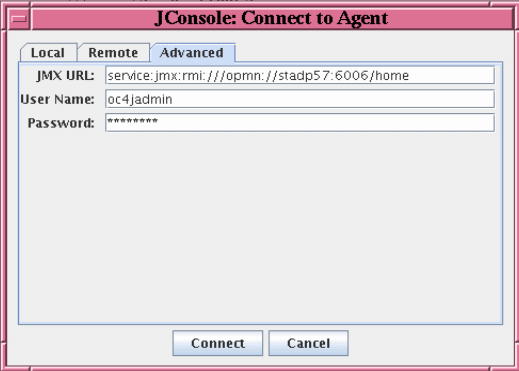
With the changes in place, I was then able to get jconsole to connect remotely to both a OC4J standalone and an Oracle Application Server instance using their respective URL forms:
  • service:jmx:rmi://[oc4j-host]:[oc4j-port]
  • service:jmx:rmi:///opmn://[opmn-host]:[opmn-port]/[oc4j-name]
I've logged a bug and try and work this fix into the 10.1.3.1 release.

I also found once I'd connected that I needed a couple of extra libraries on the client side to make jconsole work fully -- javax77.jar to get the Stats classes and dms.jar.

Here's the set of Oracle libraries required:
  • ${ORACLE_HOME}/j2ee/home/oc4jclient.jar
  • ${ORACLE_HOME}/j2ee/home/lib/adminclient.jar
  • ${ORACLE_HOME}/j2ee/home/lib/javax77.jar
  • ${ORACLE_HOME}/dms/lib/dms.jar

19 May 2006

Using Groovy for System Management

I've been funking around with Groovy in some of my spare time recently. My unabashed opinion is that Groovy is a wonderful scripting language since it enables me to use all the aspects of my favourite programming language in a very dynamic away.

One of my work mates, The Tugman(tm) -- made mention that Groovy has something called a GroovyMBean. Since I tend to work with the runtime and management areas of OC4J, I thought I'd check it out.

Turns out that the GroovyMBean provides a lovely little proxy over a MBean running on a server, enabling the MBean as if it was a standard object inside of Groovy. The GroovyMBean delegates all the calls made to it through to the underlying MBean it is wrappering.

Well that sounded quite interesting. But what's more interesting is the possibility that this opens up for the configuration and administration of OracleAS/OC4J 10.1.3.

How so?

Well OC4J and OracleAS 10.1.3 use MBeans for a lot of the actual server configuration and management tasks, as well as providing MBeans for all of the standard J2EE applications and artifacts. In fact, the management console in 10.1.3 (Application Server Control) uses JMX and the set of MBeans provided by OC4J to actually perform all of the operations it exposes in the GUI.

Thus armed with the GroovyMBean, it should be possible perform system and application administration and configuration tasks.

After a bit of playing around with it, it turns out it really IS possible to do.

As a simple illustation, here's an example of a script which displays the details of the JDK which is running an instance of OracleAS

client = new OC4JClient()
client.connect("localhost","23791","oc4jadmin","welcome1")

helper = client.helper

println "\n--> Access JVM MBean"
jvm = helper.createGroovyMBean("oc4j:J2EEServer=standalone,j2eeType=JVM,name=single")

println "\n--> Print selected attributes from JVM MBean"
println ""
println " JVM Vendor : $jvm.javaVendor"
println " JVM Version : $jvm.javaVersion"


Which when run shows:

--> Access JVM MBean

--> Print selected attributes from JVM MBean

JVM Vendor : Sun Microsystems Inc.
JVM Version : 1.5.0_04


This Groovy script simply establishes a connection to the MBeanServer running in the specified OracleAS instance, creates a GroovyMBean for the specified MBean and then displays some attributes from the MBean.

A close look at the script shows the use of two additional classes I developed when developing scripts.

  • OC4JClient -- this class makes establishing the connection to the MBeanServer running OracleAS/OC4J instance breeze. All you need to do is tell it where to connect to the server and a username and password to use. It will take care of all the details of creating the required JMX remote connection.

  • OC4JMBeanHelper -- this is the object type returned from client.helper property. The OC4JMBeanHelper provides a set of convenience methods for working with the set of OC4J System MBeans, for creating GroovyMBeans, etc.
While these additional classes are certainly not required, using them does reduce the amount of work required to work with the MBeans, reducing it down to simple scripting calls.

This is a simple illustation of a Groovy management script, but don't let it fool you. The exact same concepts can be applied using any of the OracleAS/OC4J MBeans to build up more powerful and wide ranging administration scripts.

As a further simple example, lets say you want to find out the running status of all the applications deployed to an OracleAS/OC4J instance. With groovy this is as simple as the below.

client = new OC4JClient()
client.connect("localhost","23791","oc4jadmin","welcome1")
helper = client.helper

// Print a header
30.times { print "----" }
print "\nName "
9.times { print "\t" }
println "State \t Startup \t"
30.times { print "----" }
println ""

// List all the application MBeans and print their state and startimes
for (String item : helper.AllApplicationMBeanNames ) {
app = helper.createGroovyMBean(item)
println "\n$app.objectName \t" + helper.decodeState(app.state) +"\t "+ new Date(app.startTime)
}
30.times { print "----" }
println ""

client.close()


Which when executed shows:
-------------------------------------------------------------------------------------------------------------
Name State Startup
-------------------------------------------------------------------------------------------------------------

oc4j:j2eeType=J2EEApplication,name=archer,J2EEServer=standalone RUNNING Fri May 19 11:19:02 CST 2006

oc4j:j2eeType=J2EEApplication,name=ascontrol,J2EEServer=standalone RUNNING Fri May 19 11:19:02 CST 2006

oc4j:j2eeType=J2EEApplication,name=default,J2EEServer=standalone RUNNING Fri May 19 11:19:01 CST 2006

oc4j:j2eeType=J2EEApplication,name=exploded,J2EEServer=standalone RUNNING Fri May 19 11:19:02 CST 2006

oc4j:j2eeType=J2EEApplication,name=system,J2EEServer=standalone RUNNING Fri May 19 11:19:00 CST 2006
-------------------------------------------------------------------------------------------------------------


Now want to see the configured users for each application?


client = new OC4JClient()
client.connect("localhost","23791","oc4jadmin","welcome1")
helper = client.helper

sysname = helper.getMBeanNameForJ2EEApplication("system")
sysapp = helper.createGroovyMBean(sysname)

println "System Users"
for(user in sysapp.users) {
println " $user.name"
}
client.close()


Which shows:
System Users
JtaAdmin
steve
oc4jadmin
anonymous
j2ee


The way I see it is that given administrators have common and/or regular tasks to perform, with type of direct scripting access to the OC4J System MBeans it provides them with the ability to capture those tasks in scripts.

Which can then be executed when needed, stored in a SCCS for posterity, shared with other users and administrators, etc.

I'll be posting a lot more about this over the coming weeks and plan to put the helper classes, some more detailed documentation and a set of starter scripts onto OTN over the next few weeks.

09 May 2006

Springing into OC4J MBeans

I noticed a while back that Spring has a funky little mechanism by which it can export its beans as JMX MBeans.

Which pricked my attention since it meant that theoretically with OC4J 10.1.3, any Spring Beans which are configured as part of an application and exported as MBeans, could be accessed through Application Server Control using the Application MBean Browser. Giving developers the power to allow administrators to configure elements of their Spring based applications.

So I tried it out and found that it just bloody worked! Which blew me away. These standards we all operate on are a wonderful thing when they all come together.

Here's an example of a Spring configuration which defines a bean and injects some initial values for its properties:

<bean id="aussieGreetingService"
class="test.spring.beans.GreetingServiceImpl">
<property name="greeting" value="gday mate!"/>
<property name="language" value="Aussie"/>
</bean>

To make this bean configuration available as an MBean then you need to do two extra things in this configuration file.

1. Define a Spring bean which represents an MBeanServer

<bean id="greetingMbeanServer"
class="org.springframework.jmx.support.MBeanServerFactoryBean">
<property name="defaultDomain" value="GreetingService" />
</bean>

Note that this MBeanServer bean creates an MBeanServer using the specified defaultDomain -- this is injected as a property.

2. Specify which of the Spring beans should be exported as MBeans using the MBeanExport Spring bean.


<bean id="exporter"
class="org.springframework.jmx.export.MBeanExporter">
<property name="beans">
<map>
<entry key="bean:name=aussieGreetingService"
value-ref="aussieGreetingService" />
</map>
</property>
<property name="server" ref="greetingMbeanServer" />
</bean>

Note that the name of the MBeanServer in which the MBeans are to be created has to be provided -- and it points to the MBeanServer we created in Step 1.

The MBean will expose all of the relevant properties (JMX:attributes) of the JavaBean as well as the methods (jmx:operations) the JavaBean supports.

And now the cool thing -- if this configuration file is deployed as part of an application with the Spring framework libraries and the corresponding JavaBeans, then the Spring beans will be accessible as JMX MBeans using Application Server Control.

Viewing and setting JavaBean properties:


Viewing JavaBean methods:


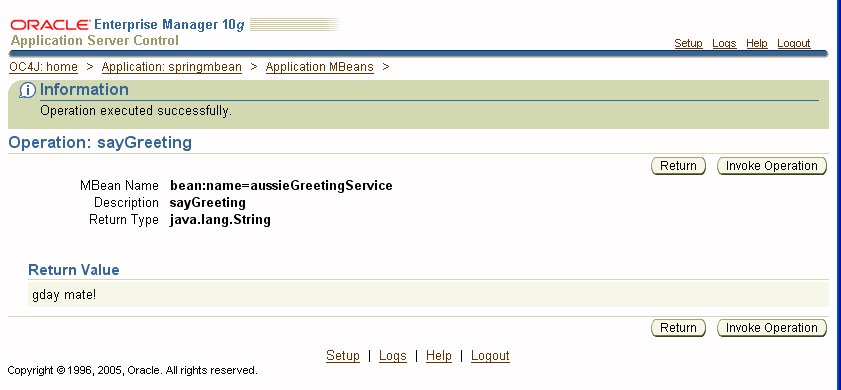
Invoking a JavaBean method:


And there you have it -- managing Spring beans using JMX with Application Server Control.