The WebLogic Server 12.1.3 EJB Developers Guide was recently updated to note that the embedded EJB container can be used by adding a reference to weblogic.jar to the CLASSPATH when the EJB client is being executed.
https://docs.oracle.com/middleware/1213/wls/EJBAD/embedejb.htm#EJBAD1403
This is very convenient since it enables the WebLogic Server embedded EJB container to used by simply adding weblogic.jar to the classpath when running the client:
Or for example if you are developing unit tests using JUnit and running them from a maven project, you can configure the maven-surefire-plugin to use WebLogic Server to run the EJB test code in its embedded EJB container:
A fully working example of using this is available in this GitHub repository:
https://github.com/buttso/weblogic-embedded-ejb
For more information have a look at the repository and check out the example.
02 February 2015


30 January 2015
WebLogic Maven Plugin - Simplest Example
I've seen a question or two in recent days on how to configure the weblogic maven plugin.
The official documentation is extensive ... but could be considered TL;DR for a quick bootstrapping on how to use it.
As a late friday afternoon exercise I just pushed out an example of a very simple project that uses the weblogic-maven-plugin to deploy a web module. It's almost the simplest configuration that can be done of the plugin to perform deployment related operations of a project/module:
https://github.com/buttso/weblogic-maven-plugin
This relies on the presence of either a local/corporate repository that contains the set of weblogic artefacts and plugins - OR - you configure and use the Oracle Maven Repository instead.
Example pom.xml
The official documentation is extensive ... but could be considered TL;DR for a quick bootstrapping on how to use it.
As a late friday afternoon exercise I just pushed out an example of a very simple project that uses the weblogic-maven-plugin to deploy a web module. It's almost the simplest configuration that can be done of the plugin to perform deployment related operations of a project/module:
https://github.com/buttso/weblogic-maven-plugin
This relies on the presence of either a local/corporate repository that contains the set of weblogic artefacts and plugins - OR - you configure and use the Oracle Maven Repository instead.
Example pom.xml
Updated WebLogic Server 12.1.3 Developer Zip Distribution
We've just pushed out an update to the WebLogic Server 12.1.3 Developer Zip distribution containing the bug fixes from a recent PSU (patch set update).
This is great for developers since it maintains the high quality of the developer zip distribution and the convenience it provides - avoids reverting to the generic installer to then enable the application of patch set updates. For development use only.
Download it from OTN:
http://www.oracle.com/technetwork/middleware/weblogic/downloads/wls-for-dev-1703574.html
Check out the readme for the list of bug fixes:
http://download.oracle.com/otn/nt/middleware/12c/wls/1213/README_WIN_UP1.txt
This is great for developers since it maintains the high quality of the developer zip distribution and the convenience it provides - avoids reverting to the generic installer to then enable the application of patch set updates. For development use only.
Download it from OTN:
http://www.oracle.com/technetwork/middleware/weblogic/downloads/wls-for-dev-1703574.html
Check out the readme for the list of bug fixes:
http://download.oracle.com/otn/nt/middleware/12c/wls/1213/README_WIN_UP1.txt
29 January 2015
Oracle Maven Repository - Rolling News
Oracle Maven Repository Is Live
The Oracle Maven Repository is live and available for public access to the public APIs, libraries, utilities and archetypes that are shipped as part of the Oracle WebLogic Server 12.1.2 and 12.1.3 releases, including corresponding Coherence versions.
** The repository also publishes the same from the ADF, SOA, OSB and other Fusion Middleware options.
Oracle Maven Repository http://maven.oracle.com
Using the Oracle Maven Repository https://maven.oracle.com/doc.html
Rolling News
Oracle Maven Repository is Live
https://redstack.wordpress.com/2015/01/14/happy-new-year-happy-new-oracle-maven-repository
WebLogic Server and Oracle Maven Repository
https://blogs.oracle.com/WebLogicServer/entry/weblogic_server_and_the_oracle
Oracle Maven Repository Index Available
https://redstack.wordpress.com/2015/01/23/oracle-maven-repository-index-now-available-more-to-come/
https://blogs.oracle.com/WebLogicServer/entry/oracle_maven_repository_index_now
JFrog Artifactory Supports Oracle Maven Repository
http://www.jfrog.com/confluence/display/RTF/Artifactory+3.5.1http://buttso.blogspot.com.au/2015/02/fronting-oracle-maven-repository-with.html
Sonatype Nexus Supports Oracle Maven Repository
https://github.com/archenroot/nexus-oss/releases/tag/nexus-2.11.2-01https://issues.sonatype.org/browse/NEXUS/fixforversion/14525/?selectedTab=com.atlassian.jira.jira-projects-plugin:version-summary-panel
28 January 2015
Updating a GitHub forked repository
Mostly a reminder to self but thought I'd post the link in case anyone else is looking for this. More pointers the merrier.
Simple, straight forward steps to synchronise a forked repository with its upstream repository and keep it up to date.
https://help.github.com/articles/syncing-a-fork
Take care to read the final tip in the guide that notes that the steps only update a local copy - the fetch and merge changes still need to be pushed back to the GitHub remote repository.
Simple, straight forward steps to synchronise a forked repository with its upstream repository and keep it up to date.
https://help.github.com/articles/syncing-a-fork
Following these simple steps enables a forked repository to be easily and regularly updated with changes from the upstream repository.Syncing a fork
Sync a fork of a repository to keep it up-to-date with the upstream repository.
...
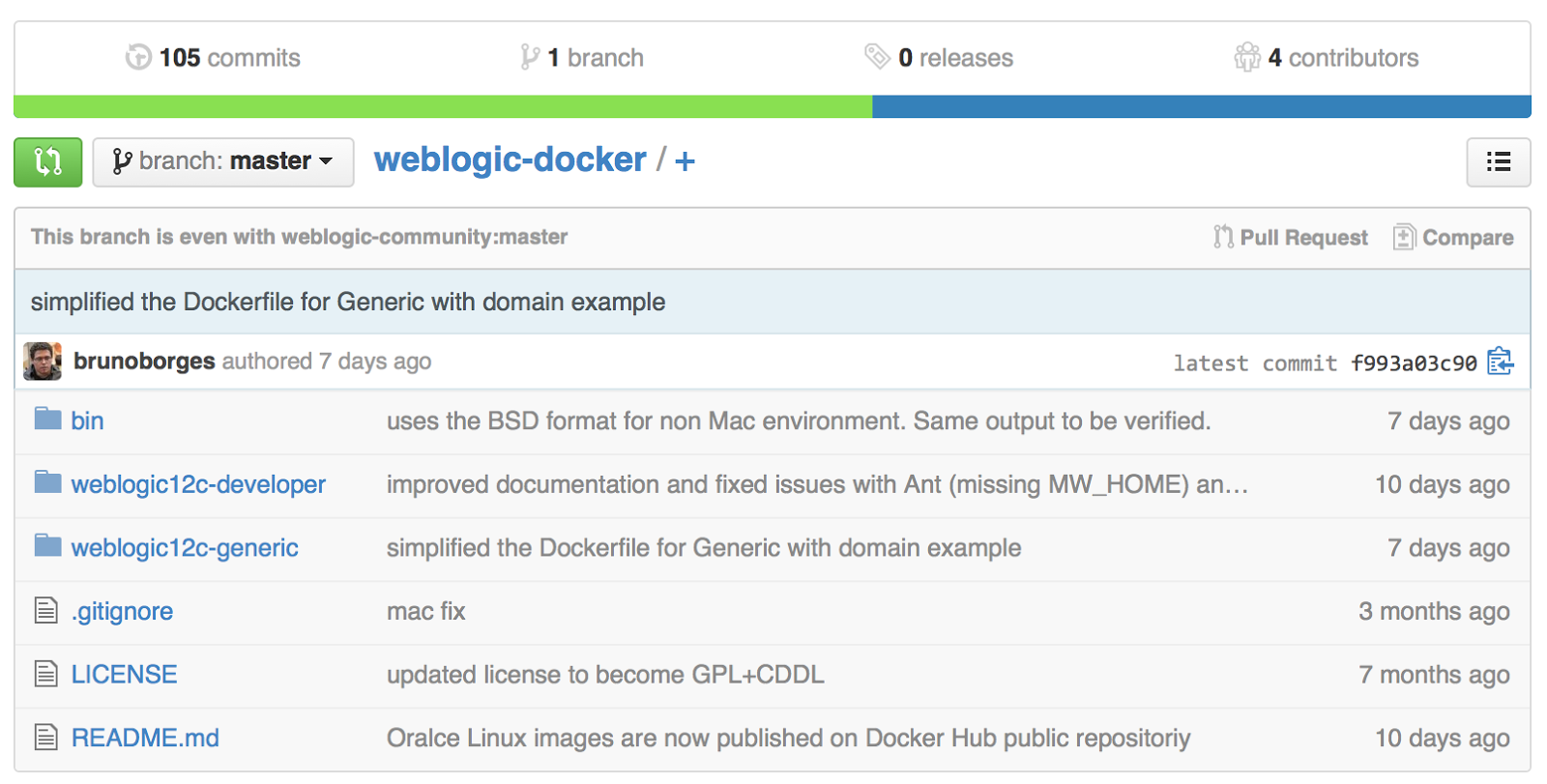 |
| Up-to-date fork of the weblogic-docker repository |
Tip: Syncing your fork only updates your local copy of the repository. To update your fork on GitHub, you must push your changes.
13 January 2015
Oracle Maven Repository is Live with WebLogic Server Artifacts
Oracle Maven Repository
Very. Exciting. News.
The Oracle Maven Repository has just gone live and is now available for public access, loaded with WebLogic Server artifacts from the 12.1.2 and 12.1.3 releases.
Want free and easy access to WebLogic Server APIs, libraries and plugins - just have at it!
http://maven.oracle.com
https://blogs.oracle.com/WebLogicServer/entry/weblogic_server_and_the_oracle
11 December 2014
Exploring DevOps with Chef and WebLogic Server
I'm about to embark on a journey that explores the use of WebLogic Server within a DevOps regime. My first port of call for this journey will be using Chef.
A loose travel itinerary is:
The Docker project is here on GitHub:
I also tried a quick experiment with using Oracle Linux as the base docker image:
The Dockerfile contains the set of instructions required to install the ChefDK and the necessary utilities into the docker image when it is built.
With this Dockerfile a build operation can be performed that produces a docker image, which can then be run to provide an environment in which start exploring the Chef.
This is just a brief outline - I will describe this first task in more detail once I get a bit further along and can verify everything has been installed and works correctly.
A loose travel itinerary is:
- Setting up an environment to explore the basic operations of Chef - using the Chef Development Kit (ChefDK)
- Exploring the basics of how Chef works to install Java and WebLogic Server on a single node
- Installing and examining some of the existing cookbooks that are available for Java and WebLogic Server
- Extending the environment to provision multiple nodes to create a typical multiple machine clustered WebLogic Server environment
The Docker project is here on GitHub:
I also tried a quick experiment with using Oracle Linux as the base docker image:
The Dockerfile contains the set of instructions required to install the ChefDK and the necessary utilities into the docker image when it is built.
#
# Dockerfile for Chef 4 WLS Environment
#

FROM ubuntu

MAINTAINER Steve Button <>

ENV     DEBIAN_FRONTEND noninteractive

# Install Utilities
RUN apt-get update
RUN apt-get install -yq wget
RUN apt-get install -yq curl
RUN apt-get install -yq git

# Install Chef
RUN wget https://opscode-omnibus-packages.s3.amazonaws.com/ubuntu/12.04/x86_64/chefdk_0.3.5-1_amd64.deb
RUN dpkg -i chefdk*.deb

# Verify and Setup Chef
RUN chef verify
RUN echo 'eval "$(chef shell-init bash)"' << ~/.bashrc

...

CMD ["/bin/bash"]
With this Dockerfile a build operation can be performed that produces a docker image, which can then be run to provide an environment in which start exploring the Chef.
$ docker build -t buttso/chef4wls .

$ docker run -ti buttso/chef4wls

oracle@5481a3330f27:~$ which chef-client
/opt/chefdk/embedded/bin/chef-client
This is just a brief outline - I will describe this first task in more detail once I get a bit further along and can verify everything has been installed and works correctly.
12 September 2014
Retro Day - Workload Management in WebLogic Server
Quite recently, I stumbled across this older but still very relevant whitepaper on the workload management capabilities of WebLogic Server. Written by one of the key engineers at the time, who later went on to become an architectect, it explains the workings of the new work load management feature introduced into WebLogic Server at the time and covers the concepts of work-manager configuration and effect, work scheduling and prioritization, overload protection and more.
This is well worth a read if you are ever looking for good information on the work load management feature of WebLogic Server:
http://www.oracle.com/technetwork/articles/entarch/workload-management4-101578.html
This is well worth a read if you are ever looking for good information on the work load management feature of WebLogic Server:
http://www.oracle.com/technetwork/articles/entarch/workload-management4-101578.html
31 July 2014
Developing with JAX-RS 2.0 for WebLogic Server 12.1.3
In an earlier post on the topic of Using JAX-RS 2.0 with WebLogic Server 12.1.3, I described that we've utilized the shared-library model to distribute and enable it.
This approach exposes the JAX-RS 2.0 API and enlists the Jersey 2.x implementation on the target server, allowing applications to make use of it as when they are deployed through a library reference in a weblogic deployment descriptor.
The one resulting consideration here from a development perspective is that since this API is not part of the javaee-api-6.jar nor is it a default API of the server, it's not available in the usual development API libraries that WebLogic provides.
For instance the
To develop an application using JAX-RS 2.0 to deploy to WebLogic Server 12.1.3, the javax.ws.rs-api-2.0.jar needs to be sourced and added to the development classpath.
Using maven, this is very simple to do by adding an additional dependency for the
Note here that the scope is set to provided since the library will be realized at runtime through
For other build systems using automated dependency management such as Gradle or Ant/Ivy, the same sort of approach can be used.
For Ant based build systems, the usual approach of obtaining the necessary API libraries and adding them to the development CLASSPATH will work. Be mindful that there is no need to bundle the jax.ws.rs-ap-2.0.jar in the application itself as it will be available from the server when correctly deployed and referenced in the weblogic deployment descriptor.
This approach exposes the JAX-RS 2.0 API and enlists the Jersey 2.x implementation on the target server, allowing applications to make use of it as when they are deployed through a library reference in a weblogic deployment descriptor.
The one resulting consideration here from a development perspective is that since this API is not part of the javaee-api-6.jar nor is it a default API of the server, it's not available in the usual development API libraries that WebLogic provides.
For instance the
$ORACLE_HOME/wlserver/server/lib/api.jar doesn't contain a reference to the JAX-RS 2.0 API, nor do the set of maven artifacts we produce and push to a repository via the oracle-maven-sync plugin contain the javax.ws.rs-api-2.0.jar library.To develop an application using JAX-RS 2.0 to deploy to WebLogic Server 12.1.3, the javax.ws.rs-api-2.0.jar needs to be sourced and added to the development classpath.
Using maven, this is very simple to do by adding an additional dependency for the
javax.ws.rs:javax.ws.rs-api:2.0 artifact that is hosted in public maven repositories: <dependency>
<groupid>javax.ws.rs</groupid>
<artifactid>javax.ws.rs-api</artifactid>
<version>2.0</version>
<scope>provided</scope>
</dependency>
Note here that the scope is set to provided since the library will be realized at runtime through
jax-rs-2.0.war shared-library that it deployed to the target server and referenced by the application. It doesn't need to be packaged with the application to deploy to WebLogic Server 12.1.3.For other build systems using automated dependency management such as Gradle or Ant/Ivy, the same sort of approach can be used.
For Ant based build systems, the usual approach of obtaining the necessary API libraries and adding them to the development CLASSPATH will work. Be mindful that there is no need to bundle the jax.ws.rs-ap-2.0.jar in the application itself as it will be available from the server when correctly deployed and referenced in the weblogic deployment descriptor.
30 July 2014
Using Eclipse (OEPE) to Develop Applications using WebSocket and JSON Processing API with WebLogic Server 12.1.3
Following from my last posting, I thought I'd also show how Eclipse (OEPE) makes the new Java EE 7 APIs available from Oracle WebLogic Server 12.1.3.
The first step was downloading and installing the Oracle Enterprise Pack for Eclipse (OEPE) distribution from OTN.
http://www.oracle.com/technetwork/developer-tools/eclipse/downloads/index.html
Firing up Eclipse, the next step is to add a new Server type for Oracle WebLogic Server 12.1.3, pointing at a local installation.
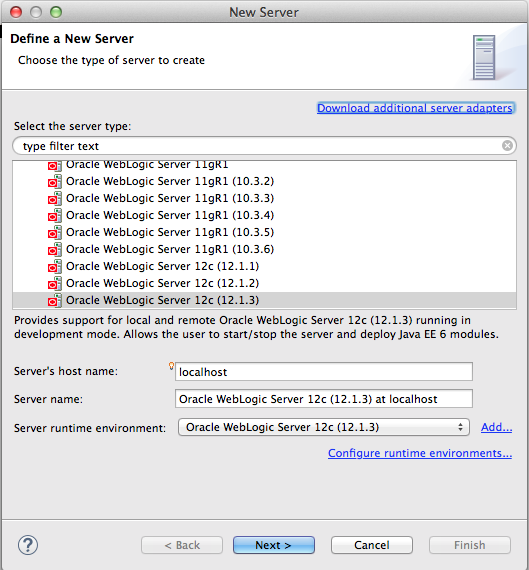

With that done, I then created a new Dynamic Web Project that was directed to work against the new WebLogic Server type I'd created. Looking at the various properties for the project, you can see that the WebSocket 1.0 and JSON Programming 1.0 libraries are automatically picked up and added to the Java Build Path of the application, by virtue of being referenced as part of the WebLogic System Library.

Into this project, I then copied over the Java source and HTML page from my existing Maven project, which compiled and built successfully.
For new applications using these APIs, Eclipse will detect the use of the javax.websocket API and annotations, the javax.json API calls and so forth and present you with a dialog asking you if you want to import the package to the class to resolve the project issues.

With the application now ready, selecting the Run As > Run on Server menu option launches WebLogic Server, deploys the application and opens an embedded browser instance to access the welcome page of the application.
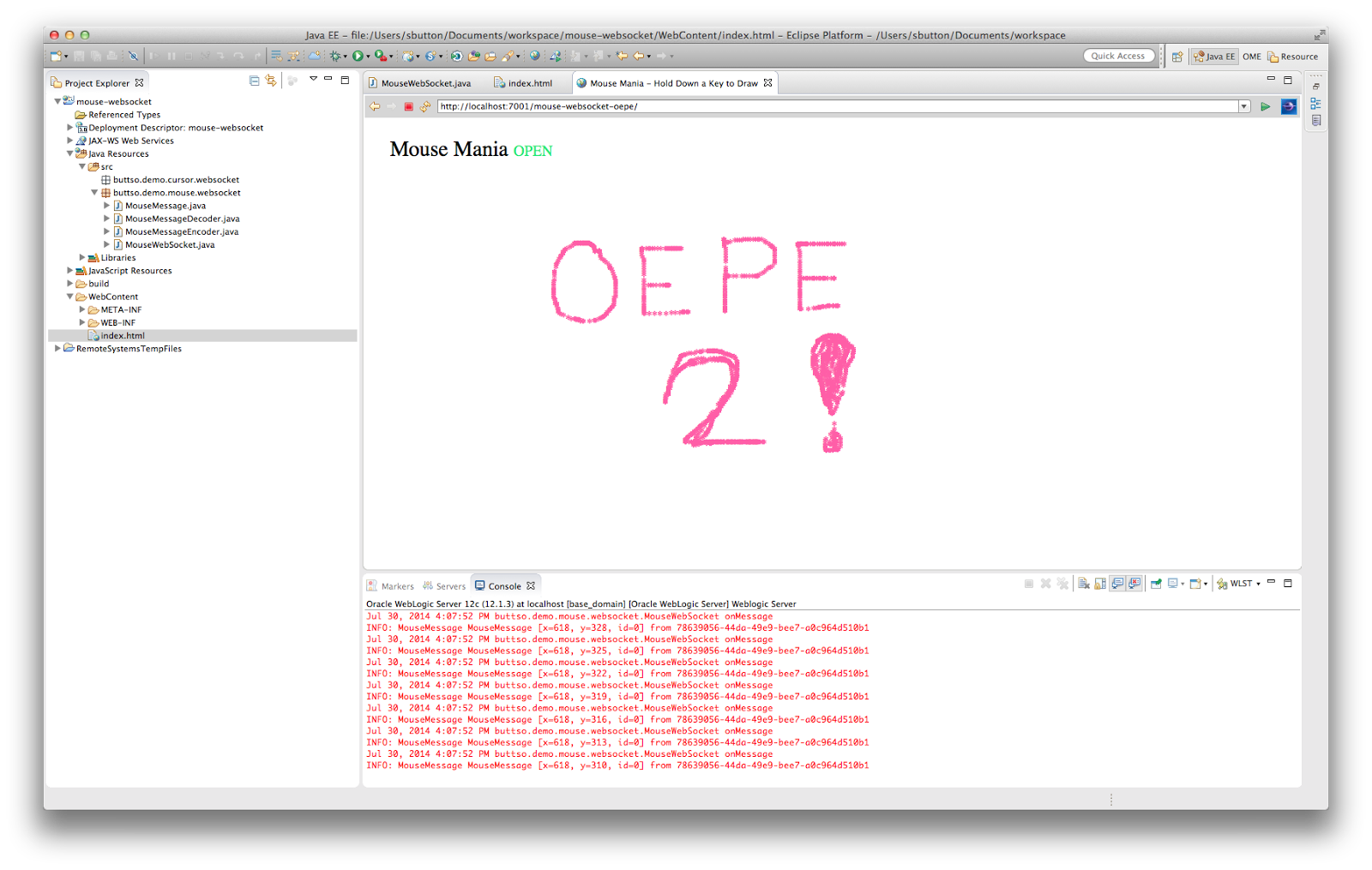
And there's the test application built in Eclipse using the WebSocket and JSON Processing APIs running against WebLogic Server 12.1.3.
The first step was downloading and installing the Oracle Enterprise Pack for Eclipse (OEPE) distribution from OTN.
http://www.oracle.com/technetwork/developer-tools/eclipse/downloads/index.html
Firing up Eclipse, the next step is to add a new Server type for Oracle WebLogic Server 12.1.3, pointing at a local installation.
With that done, I then created a new Dynamic Web Project that was directed to work against the new WebLogic Server type I'd created. Looking at the various properties for the project, you can see that the WebSocket 1.0 and JSON Programming 1.0 libraries are automatically picked up and added to the Java Build Path of the application, by virtue of being referenced as part of the WebLogic System Library.
Into this project, I then copied over the Java source and HTML page from my existing Maven project, which compiled and built successfully.
For new applications using these APIs, Eclipse will detect the use of the javax.websocket API and annotations, the javax.json API calls and so forth and present you with a dialog asking you if you want to import the package to the class to resolve the project issues.
With the application now ready, selecting the Run As > Run on Server menu option launches WebLogic Server, deploys the application and opens an embedded browser instance to access the welcome page of the application.
And there's the test application built in Eclipse using the WebSocket and JSON Processing APIs running against WebLogic Server 12.1.3.
Subscribe to:
Posts (Atom)