Not sure how I overlooked this, but according to this page here:
http://wikis.sun.com/display/OpenJDK/Mac+OS+X+Port
There are prebuilt (unofficial) binaries for Java SE 7 on Mac OS X here:
http://code.google.com/p/openjdk-osx-build/downloads/list?q=label:Featured
Good stuff.
Showing posts with label Mac OS X. Show all posts
Showing posts with label Mac OS X. Show all posts
13 July 2011


17 June 2011
Building and Running OpenJDK 7 on Mac OS X - A Breeze
Preparing a little for the Adelaide JUG meeting yesterday, where Java SE 7 was going to be the topic of discussion, I finally thought it was time to grab the OpenJDK 7 source, get it built and working on my Mac.
http://wikis.sun.com/display/OpenJDK/Mac+OS+X+Port
After checking off the pre-reqs, the process was as simple as following the small set of very clear instructions on the Wiki page.
The only small side excursion I had was that my bash environment had a JAVA_HOME env var set, which aborted the build at one point. Unsetting that and restarting the build, it then ran flawlessly for about 30mins before out popped a shiny new Open JDK 7 build.
Having never manually installed a JDK on my Mac (Apple updates have served me well) the instructions for how and where to install it was very helpful. And so simple! Particularly with how it results in the new JDK being visible to the
Voila!
Now looking forward to trying out some of the new language features with NetBeans 7.0.

All in all, a total breeze! Kudos to the OpenJDK Mac porters group.
http://wikis.sun.com/display/OpenJDK/Mac+OS+X+Port
After checking off the pre-reqs, the process was as simple as following the small set of very clear instructions on the Wiki page.
The only small side excursion I had was that my bash environment had a JAVA_HOME env var set, which aborted the build at one point. Unsetting that and restarting the build, it then ran flawlessly for about 30mins before out popped a shiny new Open JDK 7 build.
Having never manually installed a JDK on my Mac (Apple updates have served me well) the instructions for how and where to install it was very helpful. And so simple! Particularly with how it results in the new JDK being visible to the
/usr/libexec/java_home utility:
sbutton:~ $ /usr/libexec/java_home  -V

Matching Java Virtual Machines (4):

1.6.0_24-b07-334, x86_64: "Java SE 6" /System/Library/Java/JavaVirtualMachines/1.6.0.jdk/Contents/Home

1.6.0_24-b07-334, i386: "Java SE 6" /System/Library/Java/JavaVirtualMachines/1.6.0.jdk/Contents/Home

1.7.0, x86_64: "OpenJDK 7" /Users/sbutton/Library/Java/JavaVirtualMachines/1.7.0.jdk/Contents/Home

1.7.0, i386: "OpenJDK 7" /Users/sbutton/Library/Java/JavaVirtualMachines/1.7.0.jdk/Contents/Home
Voila!
sbutton:~ $ export JAVA_HOME=`/usr/libexec/java_home  -v 1.7`

sbutton:~ $ java -version

openjdk version "1.7.0-internal"

OpenJDK Runtime Environment (build 1.7.0-internal-sbutton_2011_06_16_11_39-b00)

OpenJDK 64-Bit Server VM (build 21.0-b15, mixed mode)
Now looking forward to trying out some of the new language features with NetBeans 7.0.

All in all, a total breeze! Kudos to the OpenJDK Mac porters group.
30 May 2011
VI customizations for syntax coloring, auto-indenting and more
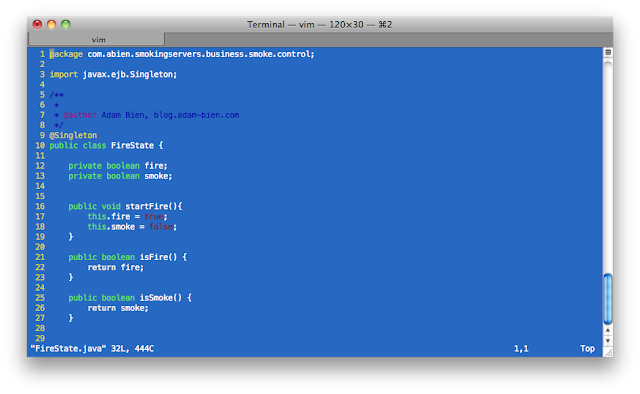
A colleague recently sent me a VIM resource file to configure how VIM displays code.
A small set of simple changes, but the effect is very nice and makes the casual viewing of code, scripts, etc. much nicer with line numbering, auto-indenting, syntax color coding, etc.
 Thanks Mark.
A small set of simple changes, but the effect is very nice and makes the casual viewing of code, scripts, etc. much nicer with line numbering, auto-indenting, syntax color coding, etc.
$ cat ~/.vimrc

set shiftwidth=2
set tabstop=2
set number
set ruler
set expandtab
set smartindent
set autoindent
set showmatch
:syntax enable
highlight Statement ctermfg=white
highlight PreProc ctermfg=3
set pastetoggle=<F10>
This is what it looks with a Java file:

28 June 2010
Installing NetBeans 6.9 Fails when XCode is Running
I've been trying to install the NetBeans 6.9 official release (netbeans-6.9-ml-java-macosx.dmg) but it kept on failing during the "Preparing Installation" phase. No detailed errors were shown other than a generic statement to contact my software vendor.
Turned out, at least on my MacBook Pro, that the cause seemed to be that XCode was running at the same time. As soon as I quit from XCode and ran the NetBeans installer from the same installation package, it worked without any problems and installed NetBeans successfully.
Don't know if this is isolated to NetBeans or more generally to the installer technology used on the Mac, but it seems that there was some contention with Xcode, which resulted in the installer not working.
Turned out, at least on my MacBook Pro, that the cause seemed to be that XCode was running at the same time. As soon as I quit from XCode and ran the NetBeans installer from the same installation package, it worked without any problems and installed NetBeans successfully.
Don't know if this is isolated to NetBeans or more generally to the installer technology used on the Mac, but it seems that there was some contention with Xcode, which resulted in the installer not working.
24 June 2010
Dynamically Setting JAVA_HOME on Mac OS X
This was a new discovery to me today, so please ignore if this is widely used and known.
On Mac OS X, there is a very specific, managed directory structure for the various Java versions that are installed. The general directory is "/System/Library/Frameworks/JavaVM.framework/". For those of us new to Mac OS X, the sub-directories under there look a little foreign.
To run WLS, you need to set JAVA_HOME to the appropriate directory before you can start a domain. Hardcoding the directory into either .bashrc or the startWebLogic.sh scripts does the trick.
But today I stumbled on another little utility that can be used to dynamically determine the current JAVA_HOME, as set in the user preferences:
Thus setting JAVA_HOME dynamically in scripts, shell profiles can be done simply like this:
On Mac OS X, there is a very specific, managed directory structure for the various Java versions that are installed. The general directory is "/System/Library/Frameworks/JavaVM.framework/". For those of us new to Mac OS X, the sub-directories under there look a little foreign.
To run WLS, you need to set JAVA_HOME to the appropriate directory before you can start a domain. Hardcoding the directory into either .bashrc or the startWebLogic.sh scripts does the trick.
But today I stumbled on another little utility that can be used to dynamically determine the current JAVA_HOME, as set in the user preferences:
NAME
       java_home - return a value for $JAVA_HOME

SYNOPSIS
       /usr/libexec/java_home [options]

DESCRIPTION
       The  java_home  command  returns  a path suitable for setting the JAVA_HOME environment variable.  It
       determines this path from the user's preferred Java in the Java Preferences application.   Additional
       constraints may be provided to filter the list of JVMs available.  By default, if no constrants match
       the available list of JVMs, the default order is used.  The path is printed to standard output.
Thus setting JAVA_HOME dynamically in scripts, shell profiles can be done simply like this:
export JAVA_HOME=`/usr/libexec/java_home`
04 June 2010
Running WLS on Mac OS X with Correct Memory Settings
The shell scripts that launch WLS on Mac OS X don't seem to set the JAVA_VENDOR to Apple, which means that the relevant USER_MEM_ARGS are not specified when the server is started.
To remedy this I've been setting JAVA_VENDOR="Apple" before starting my domain.
But occasionally I forget. So to automate the setting, I udpated $DOMAIN_DIR/bin/setDomainEnv.sh as follows:
This then results in the relevant MEM_ARGS for Apple being set later in the script:
To remedy this I've been setting JAVA_VENDOR="Apple" before starting my domain.
But occasionally I forget. So to automate the setting, I udpated $DOMAIN_DIR/bin/setDomainEnv.sh as follows:
if [ "${JAVA_VENDOR}" = "Oracle" ] ; then
JAVA_HOME="${BEA_JAVA_HOME}"
export JAVA_HOME
else
if [ "${JAVA_VENDOR}" = "Sun" ] ; then
JAVA_HOME="${SUN_JAVA_HOME}"
export JAVA_HOME
else
if [ "`uname`" = "Darwin" ] ; then
JAVA_VENDOR="Apple"
export JAVA_VENDOR
JAVA_HOME="/System/Library/Frameworks/JavaVM.framework/Versions/1.6.0/Home"
export JAVA_HOME
fifi
fi
This then results in the relevant MEM_ARGS for Apple being set later in the script:
if [ "${JAVA_VENDOR}" = "Apple" ] ; thenNow starting the domain on Mac OS X, the necessary memory arguments are set on the JVM and the server runs as expected.
MEM_ARGS="${MEM_ARGS} ${MEM_MAX_PERM_SIZE}"
export MEM_ARGS
fi
....$ startWebLogic.sh
java version "1.6.0_20"
Java(TM) SE Runtime Environment (build 1.6.0_20-b02-279-10M3065)
Java HotSpot(TM) 64-Bit Server VM (build 16.3-b01-279, mixed mode)
Starting WLS with line:
/System/Library/Frameworks/JavaVM.framework/Versions/1.6.0/Home/bin/java -client -Xms512m -Xmx512m -XX:MaxPermSize=128m -Dweblogic.Name=myserver ...
26 May 2010
Moving up to Mac
It would be somewhat remiss of me to not mention that I've recently become a convert to the world of Mac, purchasing myself a 15" MacBook Pro.
I was a little hesitant about moving over to it, but I have to say, it's been fairly painless so far (thanks to VMware Fusion for the few remaining Windows apps I have no control over) and the rewards of using Mac OS X instead of Windows XP are plentiful.
As I sit here writing this, with a Terminal window open with WLS running happily in the background, I just noticed that Time Machine has kicked in and started an incremental backup.
And don't even get me started on the wonders of using Trackpad, Expose and Spaces ... my only question is why did I wait so long?!
I was a little hesitant about moving over to it, but I have to say, it's been fairly painless so far (thanks to VMware Fusion for the few remaining Windows apps I have no control over) and the rewards of using Mac OS X instead of Windows XP are plentiful.
As I sit here writing this, with a Terminal window open with WLS running happily in the background, I just noticed that Time Machine has kicked in and started an incremental backup.
And don't even get me started on the wonders of using Trackpad, Expose and Spaces ... my only question is why did I wait so long?!
28 April 2010
Weblogic Server 10.3.3 available on OTN
News at hand! We've just released WebLogic Server 10.3.3 and it's now available for download on OTN:
http://www.oracle.com/technology/software/products/middleware/htdocs/fmw_11_download.html
You may also note the addition of a new zip file download for WLS itself:
http://download.oracle.com/otn/nt/middleware/11g/wls1033_dev.zip
This is a new smaller distribution of WLS that we are making available as a zip file, which can be simply extracted to a local directory, one script executed to specify some access control settings, and then launch WLS directly from the command line. A new domain will automatically created if none is found.
This is a really good step forward for WLS, making it more easily installed and incorporated into development and testing environments. Please read the README.txt embedded within the zip file for more details on how to start and use the server. Note that this is only supported for development use, not for use in production deployment environments.
By the way, this new WLS zip file distribution has been tested, and is supported on Mac OS X for development use. Enjoy!
Note: an issue was identified by a reader below showing that the upgrade utility was not launching successfully. We have identified a workaround for this which involves adding two additional libraries to the PRE_CLASPATH environment variable before running the upgrade utility.
$ export PRE_CLASSPATH="${MW_HOME}/modules/features/com.bea.cie.common-plugin.launch_2.5.0.0.jar:${MW_HOME}/utils/config/10.3/config-launch.jar"
Then run upgrade command as usual.
http://www.oracle.com/technology/software/products/middleware/htdocs/fmw_11_download.html
You may also note the addition of a new zip file download for WLS itself:
http://download.oracle.com/otn/nt/middleware/11g/wls1033_dev.zip
This is a new smaller distribution of WLS that we are making available as a zip file, which can be simply extracted to a local directory, one script executed to specify some access control settings, and then launch WLS directly from the command line. A new domain will automatically created if none is found.
This is a really good step forward for WLS, making it more easily installed and incorporated into development and testing environments. Please read the README.txt embedded within the zip file for more details on how to start and use the server. Note that this is only supported for development use, not for use in production deployment environments.
By the way, this new WLS zip file distribution has been tested, and is supported on Mac OS X for development use. Enjoy!
Note: an issue was identified by a reader below showing that the upgrade utility was not launching successfully. We have identified a workaround for this which involves adding two additional libraries to the PRE_CLASPATH environment variable before running the upgrade utility.
$ export PRE_CLASSPATH="${MW_HOME}/modules/features/com.bea.cie.common-plugin.launch_2.5.0.0.jar:${MW_HOME}/utils/config/10.3/config-launch.jar"
Then run upgrade command as usual.
$ ${MW_HOME}/wlserver/common/bin/upgrade.sh
Subscribe to:
Posts (Atom)