Good article by Philippe covering the creation of a simple JMX client for WLS.
http://blogs.oracle.com/WebLogicServer/2009/09/sample_weblogic_jmx_client.html
25 September 2009


14 September 2009
Using Identity Based Connection Pooling with WebLogic Server
From an OTN how-to I recently created:
Using Identity Based Connection Pooling with WebLogic Server
The typical model of interaction an application server has with a database is through the use of datasources.
A datasource is an entity that is configured with appropriate information to allow it to create and manage connections with a database, and to hand these out to applications when they request them. A datasource typically creates pools of connections for effiency purposes and shares these amongst applications that make use of it.
In the typical datasource use case, all the connections the datasource creates use the same username and password. This results in all access to the database being performed using the same database credentials. In most cases this is perfectly acceptable and handled as part of the overall application architecture when needing to dealing with shared, partioned data.
For some rare cases, requirements can exist where it’s necessary to preserve the application user identity in some form all the way down to the database. This could be for the purposes of restricting information access, establishing audit trails, resource scheduling based on user context, etc.
To support these two different usage requirements, WebLogic Server supports two different types of connection pools through its datasource implementation:
Using Identity Based Connection Pooling with WebLogic Server
The typical model of interaction an application server has with a database is through the use of datasources.
A datasource is an entity that is configured with appropriate information to allow it to create and manage connections with a database, and to hand these out to applications when they request them. A datasource typically creates pools of connections for effiency purposes and shares these amongst applications that make use of it.
In the typical datasource use case, all the connections the datasource creates use the same username and password. This results in all access to the database being performed using the same database credentials. In most cases this is perfectly acceptable and handled as part of the overall application architecture when needing to dealing with shared, partioned data.
For some rare cases, requirements can exist where it’s necessary to preserve the application user identity in some form all the way down to the database. This could be for the purposes of restricting information access, establishing audit trails, resource scheduling based on user context, etc.
To support these two different usage requirements, WebLogic Server supports two different types of connection pools through its datasource implementation:
- Homogeneous: Regardless of the current user of the application, all connections in the pool use the same security credentials to access the DBMS.
- Heterogeneous: Allows applications to use a JDBC connection with a specific DBMS credential by pooling physical connections with different DBMS credentials.
03 September 2009
Switching Between JRockit and Sun JDK with WebLogic Server
Need to swap between JRockit and the Sun JDK when starting your WebLogic Server instance?
Looking at the start scripts $DOMAIN_HOME/bin/setDomainEnv.cmd, I just realized that this operational task is basically taken care of in the scripts we have.
To swap between the Sun JDK and JRockit to launch a WLS instance, all you need to do is set the JAVA_VENDOR environment variable to either "Sun" or "Oracle" and the scripts will take of launching WLS using the specified JDK.
Snippets from setDomainEnv.cmd:
Where JAVA_HOME is then used by startWebLogic.cmd script when it launches the WLS instance to identify the JDK to use.
Snippets from startWebLogic.cmd
With this information at hand, then switching between the two different JDKs is as simple as setting an environment variable before launching WebLogic Server.
Using JRockit:
And just as easy to switch back to Sun. Note here that you could just unset the JAVA_HOME environment variable, which will set the script to use whatever default was configured when the domain was created.
Using Sun JDK:
Looking at the start scripts $DOMAIN_HOME/bin/setDomainEnv.cmd, I just realized that this operational task is basically taken care of in the scripts we have.
To swap between the Sun JDK and JRockit to launch a WLS instance, all you need to do is set the JAVA_VENDOR environment variable to either "Sun" or "Oracle" and the scripts will take of launching WLS using the specified JDK.
Snippets from setDomainEnv.cmd:
set BEA_JAVA_HOME=d:\wls1031\jrockit_160_05_R27.6.2-20
set SUN_JAVA_HOME=d:\wls1031\jdk160_11

if "%JAVA_VENDOR%"=="Oracle" (
set JAVA_HOME=%BEA_JAVA_HOME%
) else (
if "%JAVA_VENDOR%"=="Sun" (
set JAVA_HOME=%SUN_JAVA_HOME%
) else (
set JAVA_VENDOR=Sun
set JAVA_HOME=d:\wls1031\jdk160_11
)
)
Where JAVA_HOME is then used by startWebLogic.cmd script when it launches the WLS instance to identify the JDK to use.
Snippets from startWebLogic.cmd
%JAVA_HOME%\bin\java %JAVA_VM% %MEM_ARGS%
-Dweblogic.Name=%SERVER_NAME%
-Djava.security.policy=%WL_HOME%\server\lib\weblogic.policy
%JAVA_OPTIONS%
%PROXY_SETTINGS%
%SERVER_CLASS%
With this information at hand, then switching between the two different JDKs is as simple as setting an environment variable before launching WebLogic Server.
Using JRockit:
>set JAVA_VENDOR=Oracle
>startWebLogic.cmd
...
d:\wls1031\JROCKI~1.2-2\bin\java -jrockit -Xms512m -Xmx512m -Dweblogic.Name=AdminServer ...
And just as easy to switch back to Sun. Note here that you could just unset the JAVA_HOME environment variable, which will set the script to use whatever default was configured when the domain was created.
Using Sun JDK:
>set JAVA_VENDOR=Sun
>startWebLogic.cmd
...
d:\wls1031\JDK160~1\bin\java -client -Xms256m -Xmx512m -Dweblogic.Name=AdminServer ...
WebLogic Server Startup and Shutdown Classes
WebLogic Server supports the use of server level startup and shutdown (SU/SD) classes, which are invoked by the server when it is starting up, and conversely when it is shutting down.
The initial implementation of this functionality (not sure of the release but circa 6.x I believe) required the SU/SD classes to implement proprietary WebLogic Server interfaces:As of WebLogic Server 9.0, these interfaces were marked as deprecated.
It appears that with the introduction of the new application lifecycle listeners feature at the same time, this has resulted in reduced visbility of the new POJO based SU/SD class approach in the documentation.
So here's a brief explanation.
With the deprecation of the earlier SU/SD interfaces, a new and simpler POJO based was introduced for SU/SD classes. This requires only that a SU/SD class only has to have a static main(String args[]) method, which the server will invoke after instantiating the class. No WLS specific interfaces are needed any longer. Any arguments that were configured for the SU/SD class configuration are passed to it via the String[] args parameter.
The POJO based SU/SD class still follows all the same deployment and configuration steps used by the previous model -- the class needs to be made available on the server classpath, the SU/SD class is configured via the console with the requisite parameters and settings, and ultimately stored as an entry in config.xml.
Startup Class:
WLS Console:
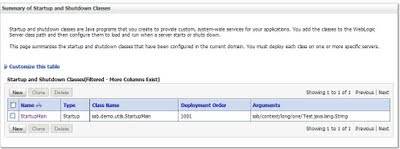
config.xml:
The initial implementation of this functionality (not sure of the release but circa 6.x I believe) required the SU/SD classes to implement proprietary WebLogic Server interfaces:
- weblogic.common.T3StartupDef
- weblogic.common.T3ShutdownDef
It appears that with the introduction of the new application lifecycle listeners feature at the same time, this has resulted in reduced visbility of the new POJO based SU/SD class approach in the documentation.
So here's a brief explanation.
With the deprecation of the earlier SU/SD interfaces, a new and simpler POJO based was introduced for SU/SD classes. This requires only that a SU/SD class only has to have a static main(String args[]) method, which the server will invoke after instantiating the class. No WLS specific interfaces are needed any longer. Any arguments that were configured for the SU/SD class configuration are passed to it via the String[] args parameter.
The POJO based SU/SD class still follows all the same deployment and configuration steps used by the previous model -- the class needs to be made available on the server classpath, the SU/SD class is configured via the console with the requisite parameters and settings, and ultimately stored as an entry in config.xml.
Startup Class:
package sab.demo.utils;

public class StartupMain {
/**
* @param args
*/
public static void main(String[] args) {

log(StartupMain.class.getName() + "::main");
log("Arguments::");
for(int i=0;args!=null && i<args.length;i++) {
log("  arg[" + i + "]: " + args[i]);
}
}

private static void log(String msg) {
System.out.printf("  --> [SAB]: %s\n", msg);
}
}
WLS Console:

config.xml:
<startup-class>
<name>StartupMain</name>
<target>AdminServer</target>
<deployment-order>1000</deployment-order>
<class-name>sab.demo.utils.StartupMain</class-name>
<arguments>arg1 arg2 arg3</arguments>
<failure-is-fatal>false</failure-is-fatal>
<load-before-app-deployments>false</load-before-app-deployments>
<load-before-app-activation>true</load-before-app-activation>
</startup-class>
28 August 2009
OC4J 10.1.3.5 Released
We published OC4J 10.1.3.5 to OTN this week.
This is a maintenance release, but it has a sprinkling of new features that had been in the works for a while and have now made it into an official OC4J release.
Download location:
http://www.oracle.com/technology/software/products/ias/htdocs/utilsoft.html
Updated Documentation:
http://download.oracle.com/docs/cd/E14101_01/index.htm
Release Notes:
http://download.oracle.com/docs/cd/E14101_01/doc.1013/e15342/oc4j.htm
New Feature List:
http://download.oracle.com/docs/cd/E14101_01/doc.1013/e15342/oc4j.htm#BDCCBAFD
I really like the small set of new features that have been added.
My pick of them, is probably the Peek utility. Peek provides a nice Web based front end for singing and dancing, all powerful, classloading functionality we've had in OC4J 10.1.3.x since its first dot zero release. Peek lets you drive easily around the classloading environment, visualizing the loader tree and letting you to drill down into it to see code-sources, packages, classes, etc. It also lets you execute the wide set of classloader queries we provide, directly from a Web browser. Really neat stuff.
There are also a set of new commands added to the admin_client utility, to support actions such as getting a listing of all deployed applications/web bindings, importing (and removing) shared libraries into applications, and a restart app command. Nice additions.
If you are still using OC4J and haven't yet moved over to the world of WebLogic Server, I reckon checking out OC4J 10.1.3.5 would be worth your time.
24 August 2009
WebLogic Server in the Amazon EC2 Cloud
I've long been wanting to try the WebLogic Server AMI image on the Amazon EC2 Cloud, but haven't yet had a chance to do it.
The description for how to get started is here:
http://www.oracle.com/technology/tech/cloud/pdf/wlsami_ref.pdf
The Amazon Machine Image (AMI) repository where WebLogic Server 10.3 is here:
http://developer.amazonwebservices.com/connect/kbcategory.jspa?categoryID=205
Has anyone out there given this a shot? What were your thoughts, how did it go?
The description for how to get started is here:
http://www.oracle.com/technology/tech/cloud/pdf/wlsami_ref.pdf
The Amazon Machine Image (AMI) repository where WebLogic Server 10.3 is here:
http://developer.amazonwebservices.com/connect/kbcategory.jspa?categoryID=205
Has anyone out there given this a shot? What were your thoughts, how did it go?
20 August 2009
Hosted WebLogic Server Documentation Changes
Just received a note regarding changes that are occuring to the WebLogic Server online documentation.
As of Friday, August 7, 2009, all BEA product documentation currently available on the BEA online documentation site (edocs.bea.com) will be available on the Oracle Technology Network (OTN).
Please note: Effective Friday, August 31, 2009, at 5:00pm PDT, the BEA online documentation site will be decommissioned.
The OTN URL for legacy WLS release documentation is:
http://www.oracle.com/technology/documentation/weblogic_server.html
The OTN URL for legacy BEA release documentation is:
http://www.oracle.com/technology/documentation/bea_doc_index.html
Please note: Effective Friday, August 31, 2009, at 5:00pm PDT, the BEA online documentation site will be decommissioned.
The OTN URL for legacy WLS release documentation is:
http://www.oracle.com/technology/documentation/weblogic_server.html
The OTN URL for legacy BEA release documentation is:
http://www.oracle.com/technology/documentation/bea_doc_index.html
History, Forms, JavaBeans and PJCs
Just came across an old document I'd written about using JavaBeans and Pluggable Java Components in Oracle Forms applications.
http://www.oracle.com/technology/products/forms/pdf/269054.pdf
It's quite funny rediscovering old stuff that you'd worked on!
http://www.oracle.com/technology/products/forms/pdf/269054.pdf
It's quite funny rediscovering old stuff that you'd worked on!
03 August 2009
Link to Oracle JDBC Javadoc
Maybe it's just me, but the javadoc for the Oracle JDBC drivers is not easily located on the Oracle documentation sites.
Finally, I found this JDBC page, which contains direct links to the javadoc for the various Oracle JDBC versions.
Oracle JDBC site
Oracle JDBC 11g R1 Javadoc
Oracle JDBC 10g R2 Javadoc
Finally, I found this JDBC page, which contains direct links to the javadoc for the various Oracle JDBC versions.
Oracle JDBC site
Oracle JDBC 11g R1 Javadoc
Oracle JDBC 10g R2 Javadoc
03 July 2009
WebLogic Server 11g (10.3.1) Released
Now that WebLogic Server 11g (10.3.1) has been released, looking forward to writing a few blogs again about topics of interest. I look after the PM work for WebLogic Server across the Web, EJB, JDBC, JTA and JCA areas. So those will be my main topics of interest I suspect.
Download WebLogic Server 11g from here:
The direct view to the WebLogic Server doc set in the revamped doc layout is here:
Download WebLogic Server 11g from here:
http://www.oracle.com/technology/software/products/ias/htdocs/wls_main.html
The direct view to the WebLogic Server doc set in the revamped doc layout is here:
http://download.oracle.com/docs/cd/E12839_01/wls.htm
Subscribe to:
Posts (Atom)