10 September 2007

Using Shared Libraries to configure Log4j

As I was mucking around with Log4j last week, it occurred to me that I could make use of the OC4J shared-library mechanism to inject the Log4J properties files into an an application when it was being deployed -- after all the properties file is just read from the classpath.

Even better, what this enables an administrator to do is to configure a set of shared-libraries that contain different log4j properties file, say enabling different log levels, and then choose between them when the application is deployed. Or additionally, make changes to in a post-deployment manner to switch between different logging settings.

OK, enough with the banal description, here's a few screen shots to show you what I'm dribbling on about here.

First off, lets assume you have a desire to capture and route your log4j entries into the OC4J log system using the OracleAppender as described here and you have a properties file that configures the appropriate settings and the log level you want to enable.

log4j.rootLogger=INFO,OJDL
log4j.appender.OJDL=oracle.core.ojdl.log4j.OracleAppender
log4j.appender.OJDL.LogDirectory=${oracle.j2ee.home}/log/oc4j
#log4j.appender.APP1.MaxSize=1000000
#log4j.appender.APP1.MaxSegmentSize=200000
#log4j.appender.APP1.Encoding=iso-8859-1
log4j.appender.OJDL.ComponentId=OracleProd

The first thing to do is to put the log4j.properties file into a JAR file, then deploy it as a shared-library to OC4J.


Once the shared-library has been published, you will see it available on the server shared-libraries page, ready to be imported. Note that in the below, I actually have two different log4j.config shared-libraries deployed.


Once the shared-library is deployed, it is then available to be imported by applications when they are deployed. By importing the log4j.info.config shared-library, the log4j.properties file is made accessible to the application and therefore used to to configure log4j for the application.

To import the shared-library during the deployment process, use the Configure Classloading button on the Deployment Tasks page.


By selecting the desired log4j.config shared-library, it will be made available to the application, and therefore dictate how the log4j log entries for the application are handled. In this specific case, the ROOT logger is set to the INFO level, and the OracleAppender is being employed to direct the log entries into the OC4J log system.

Ultimately the customized shared-library settings for the application are written into the orion-application.xml for the deployed application.


If at some point you wanted to change this application to use a lower log level such as DEBUG or TRACE then you can easily modify the import-shared-library statement to import the shared-library that has the relevant log4j.properties configuration file.

In summary, using the Oc4J shared-library mechanism and a consistent naming convention should enable you to have as many reusable log4j configurations as you need that can be applied to your applications.

----------------
Listening to: Billy Bragg - A New England

06 September 2007

Directing Log4j logs into OC4J logging system

My last posts have focussed on using the JDK standard logging API, and directing the logs being emitted into the OC4J logging system so they can be viewed and searched using the ASC LogViewer.

The log-handler mechanism we have works with the JDK standard logging constructs. The appender mechanism used by log4j is not covered by the basic configuration option in j2ee-config.xml.

However if you are using log4j, then on the surface it looks you are apparently SOL.

But if you want to get a little dirty, here's how you can also choose to redirect log4j logs into the OC4J log files.

In the OracleAS distribution, we ship a JAR file -- $ORACLE_HOME/diagnostics/lib/ojdl-log4j.jar -- that contains an OracleAppender class. Turns out, this class is a log4j appender that transforms log4j messages into the OJDL XML form.

To use this appender, simply configure it using your preferred log4j configuration mechanism. I'll use log4j.properties as an example:

log4j.rootLogger=TRACE,OJDL
log4j.appender.OJDL=oracle.core.ojdl.log4j.OracleAppender
log4j.appender.OJDL.LogDirectory=${oracle.j2ee.home}/log/oc4j
#log4j.appender.APP1.MaxSize=1000000
#log4j.appender.APP1.MaxSegmentSize=200000
#log4j.appender.APP1.Encoding=iso-8859-1
log4j.appender.OJDL.ComponentId=OracleProd

In this configuration, the log4j messages will be directed into the $ORACLE_HOME/j2ee/home/log/oc4j/log.xml file -- which is the "Diagnostics" file read and displayed by LogViewer.

To make use of the OracleAppender, you have to ensure that you have the classes available to the application to use.

One approach it to include the libraries within the application itself -- with JEE5 applications, this is dead simple using the new <librar-directory> facility, with which you specify a directory within the EAR file to hold libaries, and then plunk the libraries into that directory. EasyPeasy!

Another approach to this is to create a shared-library containing the log4j library and the ojdl-log4j.library, and then import this into the application when it is being deployed so the libraries are available to the application.

If you have a Web application, just plunk the libraries into the WEB-INF/lib directory and go.

Something to keep in mind when you are using the ojdl-log4j library is that it has a dependency on the log4j library, so they have to both be accessible at the same classloader level.

Once you have it configured, then the one log.xml file will contain log entries from OC4J, as well as any logs from log4j.

----------------
Listening to:
Powderfinger - Love your way

05 September 2007

Capturing and viewing application log messages with LogViewer

Or put another way ... directing application log messages into the OC4J logging system and viewing them.

Lets say you are wisely using some form of logging framework within your application. And when using OC4J, you use the LogViewer functionality within Application Server Control (ASC) to view the various log messages emitted by the susbsystems of OC4J. Perhaps, you think to yourself, I'd be quite convenient to also include the log messages from my application into the general OC4J log so it can be viewed from the same LogViewer.

Here's how it can be done!

I'm not getting in the religious argument as to which logging framework you are using. For pure expediency, my example will use the JDK logging API.

OK, so in your application, you are using a logger naming hierachy of some form, and using the logger to issue log messages at different levels.
Logger logger = Logger.get("foo.bar.web.EmployeeFrontEnd");

public
void doGet(HttpServletRequest request,
HttpServletResponse response) throws ServletException, IOException {response.setContentType(CONTENT_TYPE);
logger.fine(
String.format("Handling web request for %s", request.getRequestURL()));

PrintWriter out = response.getWriter();
out.println("<html>");
out.println("<head><title>EmployeeFrontEnd</title></head>");
out.println("<body>");
Employee test = Employee.getTestInstance();
logger.finest(
String.format("Test Employee Instance: %s", test));
logger.finest(
String.format("Calling %s to locate office for %s",
employeeManager.toString(),
test.identifier(test.ID_SHORT)));
String location = employeeManager.locateEmployeeOffice(test);

logger.finest(
String.format("bean returned %s for %s ",
location, test.identifier(test.ID_SHORT)));
out.printf("<p>Employee: %s</br>Office: %s</p>", test.identifier(test.ID_SHORT), location);
logger.fine(String.format("Employee currently earns $%s", test.getSalary()));
test.raiseSalary(15D);
out.printf("<p>Give employee 15percent raise, now earns %s", test.getSalary());
out.println("</body></html>");
out.close();
}

Cool.

Now if you are using standard JDK logging, you can configure the logging handlers and log levels using various mechanism, to ultimately direct the log entries from the application into some form of persistent form to view at a later point.

Now this is where the intersection with the standard logging API, OC4J and the ASC LogViewer intersect.

First off, the ASC LogViewer knows about all the log files that are generated by OC4J. Among them is the big daddy of log files -- j2ee/home/log/oc4j/log.xml -- this is known as the diagnostics log file.

How this file is constructed as a log target is done in the j2ee/home/config/j2ee-config.xml file, where the oc4j-handler is configured to use the Oracle common logging mechanism:

<log_handler name="oc4j-handler" class="oracle.core.ojdl.logging.ODLHandlerFactory">
<property name="path" value="../log/oc4j"/>
<property name="maxFileSize" value="10485760"/>
<property name="maxLogSize" value="104857600"/>
<property name="encoding" value="UTF-8"/>
<property name="supplementalAttributes" value="J2EE_APP.name,J2EE_MODULE.name,WEBSERVICE.name,WEBSERVICE_PORT.name"/>
</log_handler>

Then by convention,, the oracle naming hierachy is specified as being handled by this oc4j-handler:

<logger name="oracle" level="NOTIFICATION:1" useParentHandlers="false">
<handler name="oc4j-handler"/>
<handler name="console-handler"/>
</logger>
Thus any messages written into the "oracle" root logger will be directed to the oc4j-handler, which writes them out in XML form to the j2ee/home/log/oc4j.log.xml file.

To therefore include log messages from your application in the OC4J diagnostics log file, all you need to do is to add a new <logger> entry in the j2ee-config.xml file that specifies your logger name and the level, and declares it to use the oc4j-handler.

<logger name="foo" level="FINEST">
<handler name="oc4j-handler"/>
</logger>

Now using ASC, select the logs entry at the bottom of the page to view all the logs.
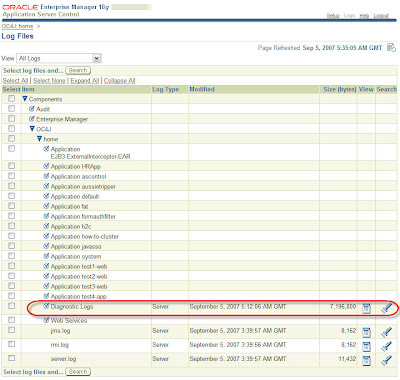


By clicking on the the Diagnostics Logs file, you should see it showing both log entries for OC4J PLUS the log entries from your application.
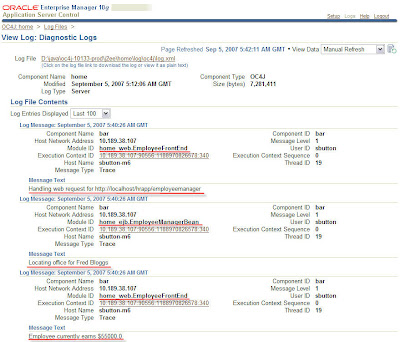


You can see from the log messages the component where the log entry was generated. From the example above you can see log messages from the web_EmployeeFrontEnd component and the ejb_EmployeeManagerBean.

Now the really really cool thing you can do from here is to view all the log entries from the same execution path. Basically what happens is that the Oracle common logging mechanism allocates an execution context ID to every log message, which enables it to then correlate the various log entries from the different components of an execution path. By simply clicking on the Execution Context ID (ECID) link for a log entry of interest, all the log files will be searched for that ECID and each entry will then be displayed in time stamp order.

This effectively gives you the log entries, in sequence for an individual request.
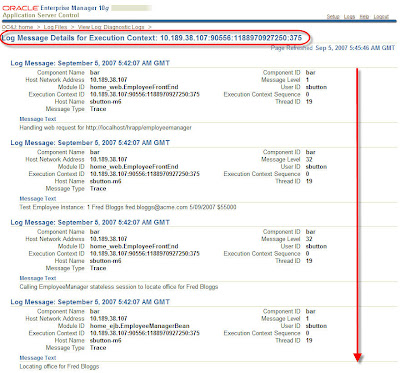


How's that for a handy capability!

Once your log entries are being handled within the Oracle common logging mechanism, you can then utilize the search facilities within the LogViewer to search for items of interest. Explore away!

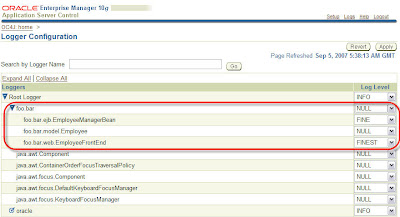
And for one final rabbit out of the hat for this blog entry, you can also use ASC to configure your application level loggers. On the Administration page, select the Configure Loggers link. If you application has run and your loggers have registered themselves (or you statically configured them in the j2ee-config.xml file) you will see the logger name listed, along with a select list to allow you to specify the levels for each logger. This lets you configure your custom application logging on the fly.


----------------
Listening to: Pixies - Here Comes Your Man

03 September 2007

Getting @ an EJBContext from External Interceptors

If you need to get at the EJBContext of the target bean from an external interceptor class, then one easy way to do it with OC4J is to lookup the following resource from within the interceptor:

EJBContext context = (EJBContext)new InitialContext().lookup("java:comp/EJBContext");

In OC4J 11 even this marginal piece of code won't be necessary as the EJBContext (and any other type of resource) can be injected directly into the interceptor.

Before I was made aware of the simpler solution above, I was resorting to using some reflection code to try and work out if there was an applicable way to get the EJBContext from the target bean. It uses first a direct field check and if that yields no results, it then looks for an accessible method that has returns an EJBContext class, or a derivative thereof.

// The EJBContext classes
final List contextClasses = Arrays.asList(
new Class[] {
javax.ejb.EJBContext.class,
javax.ejb.SessionContext.class });
/**
* Try and get the principal name from the target bean class
* @param target
* @return name of the principal
* @throws Exception
*/
String getPrincipalName(Object target) throws Exception {
String ret = getPrincipalNameFromField(target);
if(ret != null) {
return ret;
} else {
ret = getPrincipalNameFromMethod(target);
}
return(ret != null ? ret : "Ghost Rider");
}

private String getPrincipalNameFromField(Object target) throws Exception {
for(Field field : target.getClass().getFields()) {
if(contextClasses.contains(field.getType())) {
EJBContext ctx = (EJBContext)field.get(target);
return ctx.getCallerPrincipal().getName();
}
}
return null;
}

private String getPrincipalNameFromMethod(Object target) throws Exception {
Method[] methods = target.getClass().getMethods();
for (Method method: methods) {
if(contextClasses.contains(method.getReturnType())) {
EJBContext ret = (EJBContext)method.invoke(target, null);
return ret.getCallerPrincipal().getName();
}
}
return null;
}


This worked pretty well in my tests, but of course it needs the target bean class to be in a cooperative form -- the EJBontext either needs to be accessible as a public field, or there needs to be a public method to get the object from the target bean.

The JNDI lookup is easier and more reliable.

My Turner Flux

It's distinctly not OC4J or Java related, but I'm so rapt with this that I just had to express it somewhere.

My long awaited Turner Flux MTB frame has finally arrived, after close to 6 months of waiting.


I've been gathering all the parts to put on it over the last few months, so its just about ready to get built up -- I've got a sweet collection of bits for it -- Avid Juicy Carbon brakes, Race Face Deus crankset, SRAM X.0 running gear, Mavic Crossmax wheel set, Thomson seatpost and stem and more. I've just found somewhere to pick up Fox F100 RLC fork which completes the bill.

I should be living in mortal fear of my wife looking closely at the credit card bills ... but she's a total champ about it all. I think she likes getting me out of the house or maybe its because I'm a much happier bloke after a ride.

Once the build it done, I may never find the time to post another blog entry

Stop that cheering ok! :-)

Upate Sept 11: all the bits and pieces are now in place and I dropped the frame and bits into Bio-Mechanics Cycles to get it built up. Prodigy Pete seems like a top bloke, who comes very highly recommended. I think the only thing I forgot to pick up was a set of handlebar grips. Luckily Pete had some on hand. I kind of forgot to get a saddle too, so I've scavenged the Fizik Aliante off of my roadie for the time being and will see how that works out. I then may either source a Gobi, or leave the Aliante on the Turner and get my Arione back from my mate to use on the roadie.

Update Sept 20: Here's my Flux fully assembled.

It's been out for a few rides already.

Having never spent any significant time on other dual suspension rides, I can't compare it to anything else. However just in its own right, the bike is utterly fantastic. Even on the first ever ride around the block, it felt immediately comfortable. You feel like you are one with the bike and in total control.

Taking it out on the trails, the most noticeable aspect is simply how it rides. Just point and go and the bike will take you wherever you want. It floats over rocks, roots, ruts as if they weren't there. It feels like it powers through corners with the amazing amount of traction you get from the active rear end. Landing from small jumps is barely even noticeable, which lets you keep a line much more easily.

The other thing that became really apparent after a few rides was that my lower back wasn't sore at all -- riding the hardtail and bouncing around all over the shop, after an hour or so my back usually tightens up. But on this, I just didn't feel a thing.

So far, it's been a totally positive experience and I can't wait to spend some more time on it.


----------------
Listening to:
John Butler Trio - Funky Tonight

Accessing Return Values from EJB Interceptors

Continuing from my last posting regarding the application of EJB3 interceptors to existing applications, there's another interesting tidbit regarding how to access the return value of an EJB method call in an interceptor.

Thanks to some sage advice from members of our EJB team (who have authored a simply outstanding book in my opinion) turns out that you can use a simple pattern like this in your interceptor method:

public Object intercept(InvocationContext ctx) throws Exception {

// do stuff as pre-invoke
...

// Execute the bean method, or next interceptor in the chain
Object result = ctx.proceed();


// do stuff as post-invoke
...

// return the result from the handler
return result;
}


Using this pattern, you have access to the pre and post invoke states of the method call on the bean.

30 August 2007

EJB External Interceptors

Came across a situation quite recently which had a requirement for the invocation of various methods calls of an EJB to be able to logged for future auditing purposes.

The simplest answer is to use EJB3 and its Interceptor functionality in the guise of an @AroundInvoke method which gets called on every method invocation of the bean class.

Now this sounds OK if you are already using EJB3 and have access to the bean source code to modify it and add the interceptor method and the annotation.

If you don't have access to the original bean source code, you can still do it by using an external interceptor class. In this technique, you create an class external which contains interceptor method(s) and use the ejb-jar.xml file to declare the external interceptor class and bind it to the bean(s) and methods you want to apply it to.

By way of example, here's an external interceptor class:
package sab.demo.interceptors;

import javax.interceptor.InvocationContext;

public class AuditInterceptor {
public AuditInterceptor() {
}

/**
* Interceptor method which prints method call
*/
public Object logMethodCall(InvocationContext ic) throws Exception {

// The InvocationContext contains the context of the intercepted call

System.out.printf("ExternalInterceptor\n\tMethod: %s\n",
ic.getMethod().getName());

// Print out the parameter values if they exist
if(ic.getParameters().length!=0) {
System.out.printf("\tParameters: ");
boolean first = true;
String sep = ", ";
for(Object o : ic.getParameters()) {
System.out.printf(" %s", o.toString());
if(!first) {
System.out.printf("%c", sep);
} else {
first = false;
}
}
}
System.out.println();

// Carry on
return ic.proceed();
}
}
To apply this to an existing bean class, create a partial ejb-jar.xml file with the entries pertinent to the interceptor class:
<?xml version="1.0" encoding="windows-1252" ?>
<ejb-jar xmlns:xsi="http://www.w3.org/2001/XMLSchema-instance"
xsi:schemaLocation="http://java.sun.com/xml/ns/javaee http://java.sun.com/xml/ns/javaee/ejb-jar_3_0.xsd"
xmlns="http://java.sun.com/xml/ns/javaee" version="3.0">
<interceptors>
<interceptor>
<interceptor-class>sab.demo.interceptors.AuditInterceptor</interceptor-class>
<around-invoke>
<method-name>logMethodCall</method-name>
</around-invoke>
</interceptor>
</interceptors>
<assembly-descriptor>
<interceptor-binding>
<ejb-name>SomeBusiness</ejb-name>
<interceptor-class>sab.demo.interceptors.AuditInterceptor</interceptor-class>
<method>
<method-name>*</method-name>
</method>
</interceptor-binding>
</assembly-descriptor>
</ejb-jar>
When the bean is called from a client, the external interceptor is invoked and the method calls are printed to stdout:
ExternalInterceptor
Method: someBusinessMethod
Parameters: 1188441131015
The external interceptor class can be packaged within the EJB-JAR file, or alternatively, it can be packaged in a separate JAR file and included in the EAR file as a library. Using JEE5, the library can be referenced using the new <libraries ... > tag and putting the JAR file into the specified directory in the EAR file.

<application version="5">
<library-directory>libraries</library-directory>
<module>
<ejb>ejb.modulejar</ejb>
</module>
</application>
What about EJB 2.1?

Turns out this works for EJB 2.1 applications as well with some minor tweaks to the existing descriptor file.

In this case, you only really need to alter the existing ejb-jar.xml so the version is specified as "3.0" and add the interceptors tags. Whereupon OC4J (10.1.3.x) will run the bean as EJB 3.0, and apply the interceptors as specified.

Here's an example of an EJB 2.1 being converted to EJB 3.0 and the interceptors added.


<?xml version = '1.0' encoding = 'windows-1252'?>
<!--
<ejb-jar
xmlns:xsi="http://www.w3.org/2001/XMLSchema-instance"
xsi:schemaLocation="http://java.sun.com/xml/ns/j2ee
http://java.sun.com/xml/ns/j2ee/ejb-jar_2_1.xsd"
xmlns="http://java.sun.com/xml/ns/j2ee"
version="2.1" >
-->

<ejb-jar version="3.0">
<interceptors>
<interceptor>
<interceptor-class>sab.demo.interceptors.AuditInterceptor</interceptor-class>
<around-invoke>
<method-name>logMethodCall</method-name>
</around-invoke>
</interceptor>
</interceptors>
<enterprise-beans>
<session>
<description>Session Bean ( Stateless )</description>
<display-name>SomeBusiness</display-name>
<ejb-name>SomeBusiness</ejb-name>
<home>sab.demo.ejb21.SomeBusinessHome</home>
<remote>sab.demo.ejb21.SomeBusiness</remote>
<local-home>sab.demo.ejb21.SomeBusinessLocalHome</local-home>
<local>sab.demo.ejb21.SomeBusinessLocal</local>
<ejb-class>sab.demo.ejb21.SomeBusinessBean</ejb-class>
<session-type>Stateless</session-type>
<transaction-type>Container</transaction-type>
</session>
</enterprise-beans>
<assembly-descriptor>
<container-transaction>
<method>
<ejb-name>SomeBusiness</ejb-name>
<method-name>*</method-name>
</method>
<trans-attribute>Required</trans-attribute>
</container-transaction>
<interceptor-binding>
<ejb-name>SomeBusiness</ejb-name>
<interceptor-class>sab.demo.interceptors.AuditInterceptor</interceptor-class>
<method>
<method-name>*</method-name>
</method>
</interceptor-binding>
</assembly-descriptor>
</ejb-jar>


In this case, if you don't want to change the application.xml file to be versioned at JEE 5.0 and use its libraries inclusion facility, then to include the library containing the external interceptor class you can use the <library> element of the orion-application.xml file to specify the library to load:
<orion-application xsi="http://www.w3.org/2001/XMLSchema-instance" nonamespaceschemalocation="http://xmlns.oracle.com/oracleas/schema/orion-application-10_0.xsd">
<library path="InterceptorLibrary.jar"/>
</orion-application>

19 July 2007

Le Tour on SBS

It's that time of the year, where here down under, for 3 weeks, many people are staying up late at night to watch the stages of the Tour de France, live.

A very big thanks to SBS television here for the superb broadcast they put on, covering every stage. Their TdF website has video podcasts of each stage, check it out @ SBS TdF Podcasts.

Sad to see Stuey and Mick Rogers go down, but Cadel Evans is looking strong, competing well and has a good chance of getting on the podium, if not better.

Have to admit that I'm glad I'm not in Germany for the next couple of weeks, where they've just cut the broadcasts because of the latest doping infraction. Now I can see that it prevents a big audience from getting exposure to the sport/event/sponsors .... but .. and perhaps I'm a little naive but I can't grok how really punishing the general viewing public achieves anything substantive. It'll make them pissed off perhaps, but how that will prevent a dodgy rider from taking the doping route, I don't get it.

Ride on!

10 July 2007

Doc bug in RemoveSharedLibrary ant task

There's a known documentation bug for the <oracle:removeSharedLibrary ... > task.

The documentation describes the attribute name for the version of the library to use as "version". Whereas, in reality, the attribute name should be "libraryVersion" as its defined on the ant task.

You can view the various attributes/properties of an ant task by running javap on the class and looking for the accessors.
>javap -public -classpath j2ee\utilities\ant-oracle-classes.jar
oracle.ant.taskdefs.deploy.JSR88RemoveSharedLibrary

Compiled from "JSR88RemoveSharedLibrary.java"
public class oracle.ant.taskdefs.deploy.JSR88RemoveSharedLibrary
extends oracle.ant.taskdefs.deploy.JSR88BaseTask {
public oracle.ant.taskdefs.deploy.JSR88RemoveSharedLibrary();
public void execute() throws org.apache.tools.ant.BuildException;
public void setLibraryName(java.lang.String);
public java.lang.String getLibraryName();
public void setLibraryVersion(java.lang.String);
public java.lang.String getLibraryVersion();
}
The correct use of the task would be:
<oracle:removeSharedLibrary
deployerUri="deployer:oc4j:opmn://localhost/home"
userid="oc4jadmin"
password="welcome1"
libraryName="apache.xml"
libraryVersion="2.7"/>

27 June 2007

Accessing j_username in OC4J form based authentication failures

A question on the OC4J OTN forum recently asked about how the error page used in form based authentication could get access to the username that was provided so an audit trail could be established.

Intuitively you'd expect that the form fields passed in from the logon form would be passed through to the error page when an authentication fails and the forward is done. However this is not the case. The request parameter map is empty.

The solution is to use an OC4J proprietary feature called a Form Auth Filter. This is a standard Servlet Filter that can be injected into the request path when form based authentication is performed. The filter will be called before the authentication is performed and has access to the full set of request parameters passed in from the j_security_check form.

http://download-west.oracle.com/docs/cd/B32110_01/web.1013/b28959/filters.htm#sthref150

To accomplish the task of making the supplied j_username available in the error page, a form auth filter can extract the j_username parameter and store it in the request as an attribute.

Then in the error handler defined for the form-auth (jsp, struts action, etc.) simply extract the request attribute and do what you want with it.

Here's a step by step example.

1. Create a web application that uses form-based-authentication

<login-config>
<auth-method>FORM</auth-method>
<form-login-config>
<form-login-page>web-inf/logon.jsp</form-login-page>
<form-error-page>web-inf/error.jsp</form-error-page>
</form-login-config>
</login-config>

2. Create a ServletFilter to remap the j_username request parameter

package demo.sab.otn.formauthfilter;

import java.io.*;
import javax.servlet.*;
import javax.servlet.http.*;

public class FormAuthFilter implements Filter {
private FilterConfig _filterConfig = null;

public void init(FilterConfig filterConfig) throws ServletException {
_filterConfig = filterConfig;
}

public void destroy() {
_filterConfig = null;
}

public void doFilter(ServletRequest request, ServletResponse response,
FilterChain chain) throws IOException, ServletException {
HttpServletResponse res = (HttpServletResponse)response;
HttpServletRequest req = (HttpServletRequest)request;

String j_username = req.getParameter("j_username") ;
if(j_username!= null) {
req.setAttribute("j_username", j_username);
}
chain.doFilter(req, res);
}
}

3. Create an orion-web.xml file to specify the ServletFilter as a FORMAUTH filter

<?xml version = '1.0' encoding = 'windows-1252'?>
<orion-web-app>
<web-app>
<filter-mapping>
<filter-name>FormAuthFilter</filter-name>
<dispatcher>FORMAUTH</dispatcher>
</filter-mapping>
</web-app>
<security-role-mapping name="secure" impliesAll="false">
<group name="oc4j-administrators"/>
</security-role-mapping>
</orion-web-app>
3. Access the j_username attribute from the error.jsp page

<!DOCTYPE HTML PUBLIC "-//W3C//DTD HTML 4.01 Transitional//EN" "http://www.w3.org/TR/html4/loose.dtd">
<%@ page contentType="text/html;charset=windows-1252"%>
<html>
<head>
<meta http-equiv="Content-Type" content="text/html; charset=windows-1252"/>
<title>Proxy Authentication</title>
<link href="../css/blaf.css" rel="stylesheet" media="screen"/>
</head>
<body>
<h2>Error!</h2>
<%
String username = request.getAttribute("j_username")==null?
"" : (String)request.getAttribute("j_username");
%>
Error logging on as <%=username%>&nbsp;Try again.
<p>
<form method="POST" action="j_security_check">
<input type="text" name="j_username" value="<%=username%>"/>
<input type="password" name="j_password"/>
<input type="submit" value="logon"/>
</form>

</p>
</body>
</html>


Now give it a spin. When an authentication failure occurs, the error.jsp page displays the username that was last provided.


This simple example just demonstrates how to get access to the supplied j_username, what you then decide to do with it is up to you!